Knowledge Base Article
How To Setup Your Stripe Connection
Argenta uses Stripe to process every online payment, so before your public forms can take money you need to connect a Stripe account. It is a short one-time setup, and once it is done every payment form in Argenta starts working.
Connect your Stripe account
- Click Settings (the gear icon, top right).
- Choose Subscription.
- On the Subscription Settings menu, choose eCommerce Settings.
- Click Connect Your Account With Stripe.
- Follow Stripe's own steps to create or sign in to your account and add your bank details.
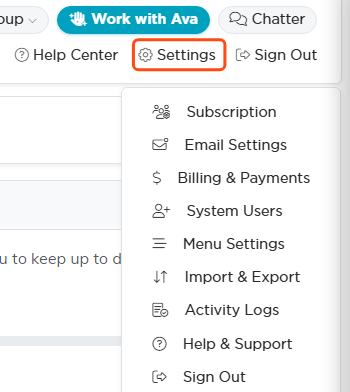
Settings is top right. Subscription is the first item.

eCommerce Settings sits on the Subscription Settings menu.
Stripe sends you back to Argenta when it is finished, and the page confirms your account is connected. From then on the button is replaced by a note pointing you to your Stripe dashboard, which is where you review or change anything on the Stripe side.
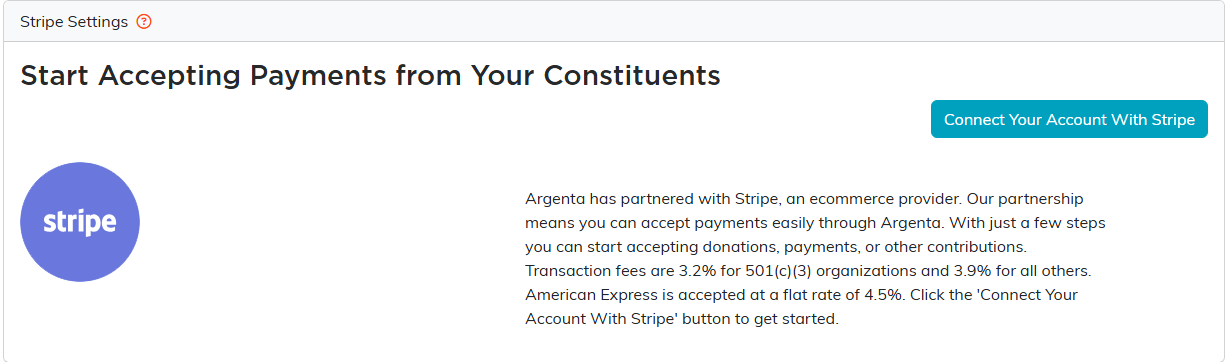
One button starts the handover to Stripe.
What connecting actually does
It links your own Stripe account to your Argenta subscription. Your money goes to your bank, not through anyone else's account.
It does not create your forms. Your public forms already exist in Argenta and are ready to design and share. Connecting Stripe is what lets them collect a payment rather than only collecting information.
What you can take payments for
Once you are connected, these all become live, depending on which parts of Argenta your organization uses:
- Donation form, general or tied to a specific campaign.
- Campaign sales form, for selling any item you like.
- Membership form, plus membership dues and fee payments.
- Event registration and ticket sales.
- Online auctions, including bidder registration.
- General payment form, for anything that does not fit the others.
- Program registration and program payments.
Transaction fees
Fees are 3.2% for 501(c)(3) organizations and 3.9% for everyone else. American Express is accepted at a flat rate of 4.5%.
Who can do this
Connecting Stripe is limited to Master Admins and Subscription Admins, since it ties a bank account to your organization. If you do not see Settings in the top right, ask an admin at your organization to run the connection for you.
Apple Pay and Google Pay
Your public payment forms offer Apple Pay and Google Pay, which for most people is the fastest way to give. There is nothing for you to switch on and nothing to register. We take care of it once your Stripe account is connected, and the buttons appear by themselves for anyone whose device and browser support them.
After you are connected
Grab your form links from Where to Find Public Form URLs in Argenta, then make the donation form your own with How To Customize Your Public Donation Form. When money starts arriving, Stripe Payouts - How They Work and Where to Find Them in Argenta explains when it reaches your bank.
If you have questions or want a hand with the setup, choose Help Center in the top right menu and submit a support ticket. We are glad to help.
