Knowledge Base Article
Add Pledges
A pledge is an estimate of how much a donor plans to give over a set period. It is not a binding contract. You can record a pledge in Argenta and later turn it into a donation once the donor follows through.
Start a new pledge
From the left-hand menu, choose Fundraising > Pledges to open your list of pledges. Click Add New. A short form opens asking for the Date Of Pledge, the Pledge Amount and the Donor. Fill those in and click Add & Enter Details, and Argenta creates the pledge and opens the Pledge Workspace on the Pledge Details screen.
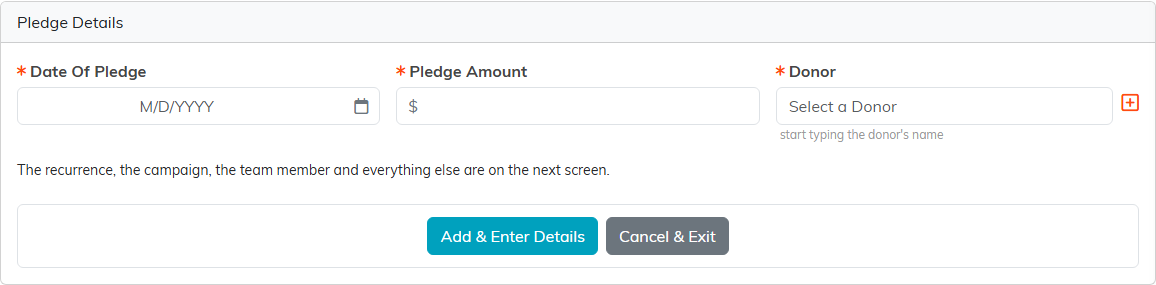
The three things Argenta needs before it creates the pledge.
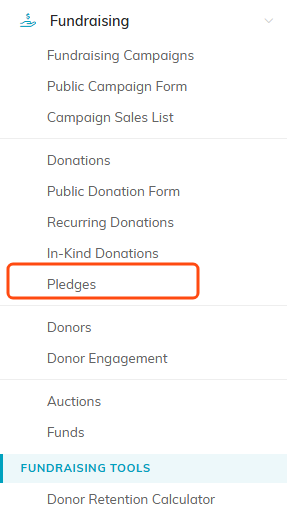
Pledges sits under Fundraising in the left menu.

Add New opens a short form for the date, the amount and the donor.
Fill in the pledge details
- Record Level Permissions - Two switches at the top. Set As View Only lets others see the pledge but not change it. Lock This Record hides it from everyone except you, master admins, and users you grant access on the Record Permissions tab.
- Date of Pledge (required) - Type a date or pick it from the calendar. It starts empty, so you have to set it.
- Pledge Amount (required) - The amount the donor plans to give.
- Donor (required) - Start typing the donor's name and select them. Use the add icon to create a new donor on the spot.
- Recurrence (Y or N) - Choose Yes if the pledge repeats.
- Recurrence Frequency - If it recurs, set how often. A pledge set to recur will not save or convert until you choose one.
- Recurrence End Date (optional) - If it recurs, the last date an instalment falls due. Leave it blank for a pledge with no end.
- Team Member Who Solicited - The staff member who brought in the pledge.
- Donation Category - Classify the pledge. Add a new category right from the dropdown if you need one.
- Associated Campaign - Tie the pledge to a campaign.
- Chapter, Division, Department - Assign the pledge to a part of your organization if you use these groupings.
Political teams also see District and Precinct dropdowns; choose the district first, then the precinct.
When you are ready, click Save All & Continue to save and keep working on the record, or Save All & Exit to save and return to the list. Cancel & Exit leaves without saving.

The two permission switches sit at the top of Pledge Details.

The three fields with an orange asterisk are the required ones.

Set Recurrence to Yes and the frequency beside it starts to matter.

The add icon beside Donation Category adds a category (admins and master builders only); the one beside Associated Campaign creates a campaign. Neither leaves the page.

Political teams see District and Precinct here as well.

Save and stay, save and go back, or leave without saving.
Turn a pledge into a donation
When the donor follows through, click Convert To Donation, at the top of the workspace or at the bottom of the page. Argenta saves your changes on the page first, then creates a matching donation and moves the pledge's files and notes over to it. A pledge can be converted once. If that donation is later deleted, the pledge goes back to unconverted and can be converted again.
Once it has been converted, the pledge shows a banner saying so with a link to the donation, that donation is listed on the pledge's Pledge Donations page, and the Convert To Donation button is gone from both places.

Convert To Donation can only be used once on a pledge.
Files, notes, and permissions
The Pledge Workspace also has Pledge Files and Pledge Notes tabs for attachments and notes, and a Record Permissions tab to control who can view or edit the pledge. For help with files, see Add Related Files. For notes, see Add A Note To The Notes Section.

The rest of the workspace: donations, files, notes and permissions.
