Knowledge Base Article
Taking Partial Payments and Deposits on an Invoice
An invoice does not have to be paid all at once. You can take a deposit up front and the rest later, or let someone pay in installments. Argenta keeps every payment against the invoice and keeps the invoice open until the payments add up to its total.
Record a Deposit Yourself
When the deposit comes in by check, cash or any other way you record by hand:
- Open the invoice and click Invoice Payments.
- Click Add A Payment. The box that opens shows the invoice total for reference.
- Enter the Payment Date and the deposit in Payment Amount.
- Click Add Payment & Enter Details, then fill in how it was paid on the payment's own page.
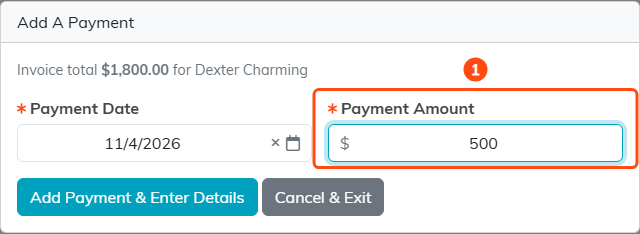
A 500 dollar deposit on an 1,800 dollar invoice.
Let Them Pay Online, Part Now and Part Later
- Open the invoice, open the Public Forms menu at the top, and choose Copy Invoice Payment Form Link.
- Send them the link. The form fills in the Amount with the balance still owed. They can lower it to pay part now, such as the deposit you agreed, but they cannot pay more than the balance: a larger amount is refused with a message naming the balance.
- When they are ready to pay the rest, send the same link again. Once part is paid, the form shows the invoice total, what has already been paid and the balance due, and fills in that balance.
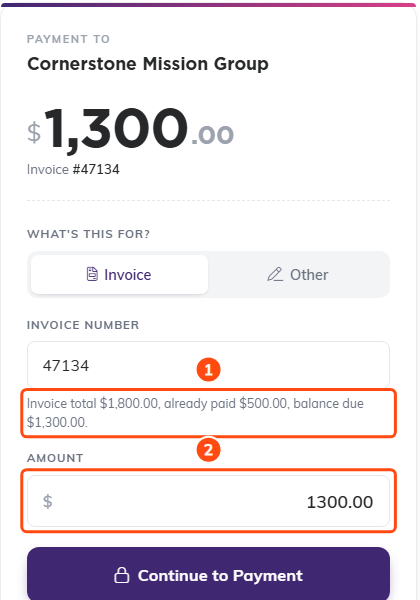
The same link after the deposit: the balance is filled in for them.
How the Invoice Keeps Track
Every payment, whether it came in online or you added it, is listed on the invoice's Invoice Payments page, with the payments total beside the invoice total.
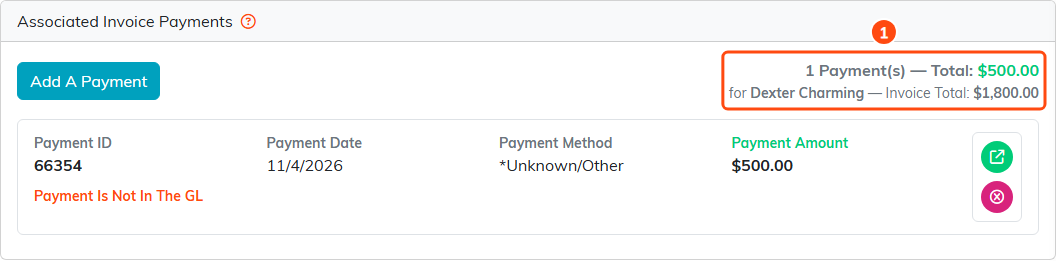
One payment of 500 dollars against an 1,800 dollar invoice.
While part is still owed, the invoice's Invoice Status is Sent/Outstanding. Once the payments cover the total, it moves to Paid/Closed and Date Paid/Closed is filled in with the date of the payment that finished it. If a payment is later changed, moved off the invoice or deleted, and the invoice is no longer paid in full, it goes back to Sent/Outstanding and the date is cleared. A paid invoice opens the payment form with This invoice has already been paid in full and asks for nothing.
