Knowledge Base Article
Why is a constituent engagement score lower than expected
A score that looks too low is usually the report being literal about what it can see, not a bug. Here is what to check, roughly in the order worth checking it.
They are missing from the report entirely
The report only returns constituents scoring above zero, so anyone with a score of exactly zero never appears. It also only scores active constituents, so a record marked inactive is left out no matter what history it holds. If someone is limited to certain chapters, divisions, departments, or precincts, they will only ever see constituents inside those.
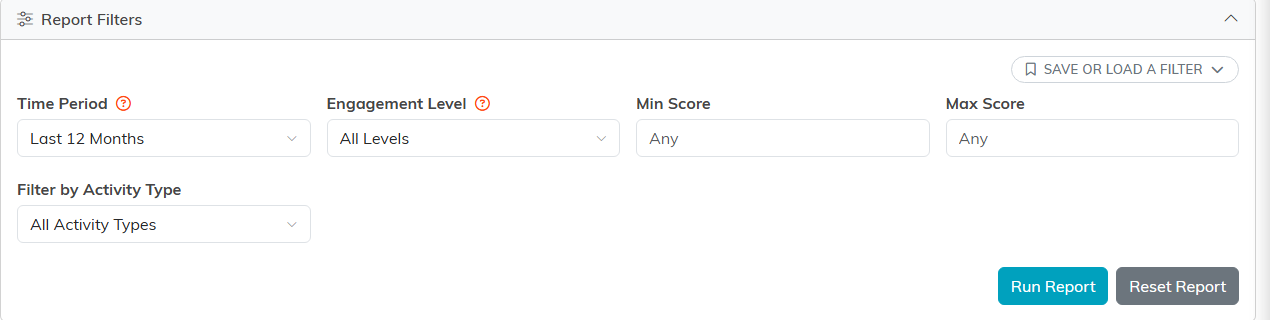
The filters: time period, level, a score range, and activity type.
The time period is doing the work
Hours, events, event committee seats, email, visits and gifts are counted inside the Time Period you picked; only active status, membership tenure and board seats are read as they stand today. A major donor who gave generously two years ago scores nothing for giving on a Last 12 Months view. Widen the period and run it again before concluding anything about a person.
The activity was never recorded
- Volunteer hours have to be logged against tasks to count.
- Event guests have to be marked as attended. An invitation on its own scores nothing, and it actually lowers the attendance rate portion of the events score.
- Member visits have to be recorded.
If a whole dimension reads zero for a lot of people at once, that is usually a data entry gap rather than genuine disengagement.
Email tracking has natural limits
Only email sent through Argenta is tracked, so anything sent from an outside system contributes nothing. On top of that, plenty of mail clients block the tracking pixel, so real opens go uncounted. Treat a low email score as a soft signal rather than proof that nobody is reading.
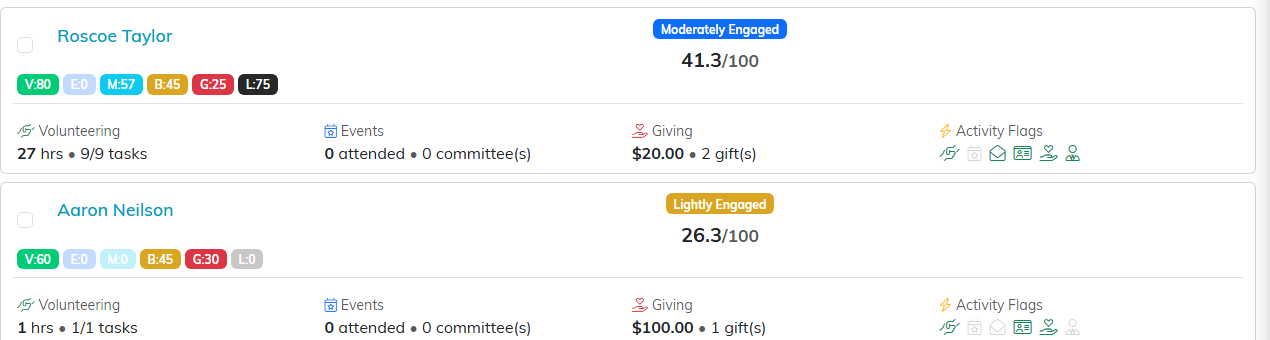
Each row shows the six dimension chips, the band, and the score out of 100.
Giving carries the most weight
Giving is 25% of the total, more than any other dimension. A committed volunteer who has never given will score lower than their involvement feels, and that is the arithmetic rather than a judgment about them. Look at the individual dimension badges before you read much into the single number.
Active status is worth real points
Being a currently active volunteer is worth 30 points of the volunteering score, and active member status is worth 40 points of the membership score. Someone with a long history who has since been marked inactive loses those points even though the history is still there.
How to check one person
- Click their name in the results to open their record in a new tab.
- Look at their volunteer, donation, event, and membership records.
- Compare the dates on that activity against the time period you ran.
For the point-by-point math, see How is the Constituent Engagement Score Calculated.
