Knowledge Base Article
How to Use Constituent Groups to Organize People
Constituent Groups let you organize people into any grouping you need, such as a committee, a family, or the contacts from one company. Groups are for organizing and tracking, separate from mailing lists, which are for sending communications.
Open Constituent Groups
Go to Constituents (CRM) > Constituent Groups. The list shows your groups; search by ID or group name, and export to CSV.
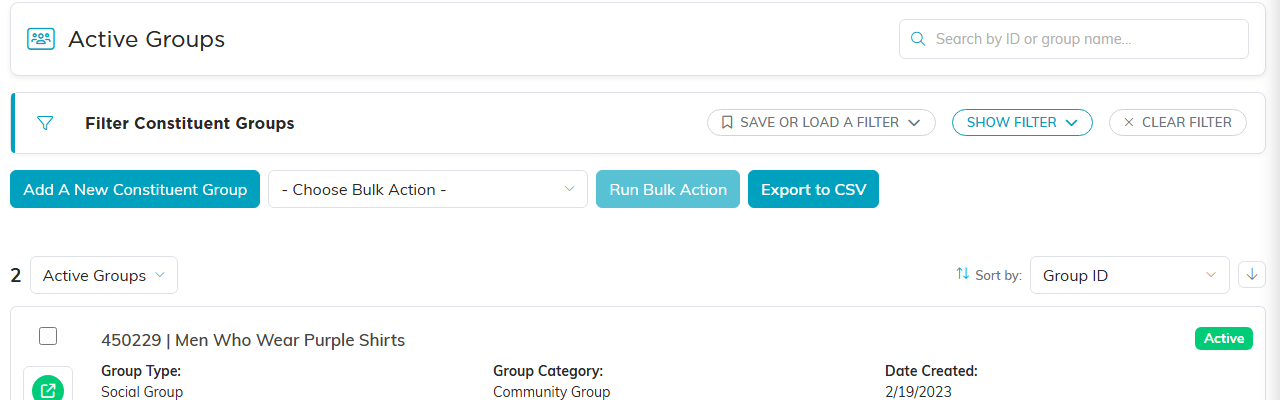
The Constituent Groups list.
Create a group
- Click Add New. Argenta asks for the Group Name first, and that is all it needs.
- Click Add & Enter Details. The group is created and its details page opens.
- There, set the Group Type, Group Category and a Group Description as needed, then save.
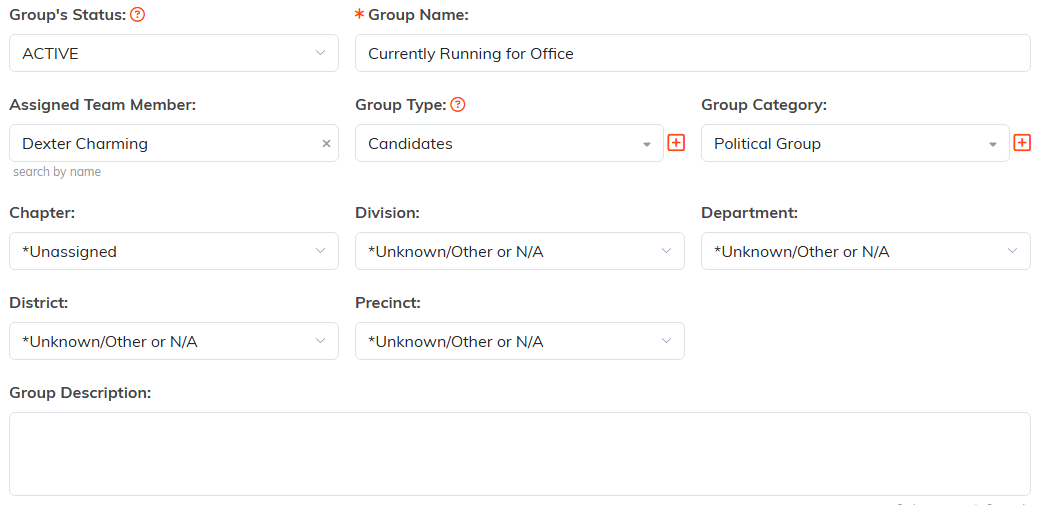
The group's details page, where Group Type, Group Category and Group Description are set.
Add people to a group
The quickest way is from the constituent list: filter or search for the people you want, check them, and use the bulk action to add them to a constituent group. The button names how many records you are about to add, and anyone already in the group is skipped rather than added twice, so the result tells you how many were added and how many were skipped. You can also build a mailing list straight from a group when you want to email its members. For the full walkthrough, see How to Use Constituent Groups.
Groups vs. mailing lists
Use a constituent group to organize and track people (a committee, a family, a company). Use a mailing list in the Mail Room when your goal is to send an email or a mailing. A group is about structure; a mailing list is about communication.
