Knowledge Base Article
How to Track Event Attendance
Attendance is recorded on the event's Participant/Guest List page, under Participants/Guests in the event workspace. There is no separate attendance tab, so everything below happens on that one page.
The Participant/Guest List page has a short Show Me How To Use This Page video at the top right; click it to watch, and use its chapters to jump to the part you need.
Marking People Attended
- One person: flip the In Attendance switch on their row. It saves as you click.
- A group: tick the rows you want, then use the bulk actions menu. Under the Attendance heading you get Mark Selected Records As Attended and Mark Selected Records As Not Attended. A guest already marked that way is skipped, and so is a guest locked or set to View Only for you unless you are a Master Admin; the message says how many were changed and why any were skipped.
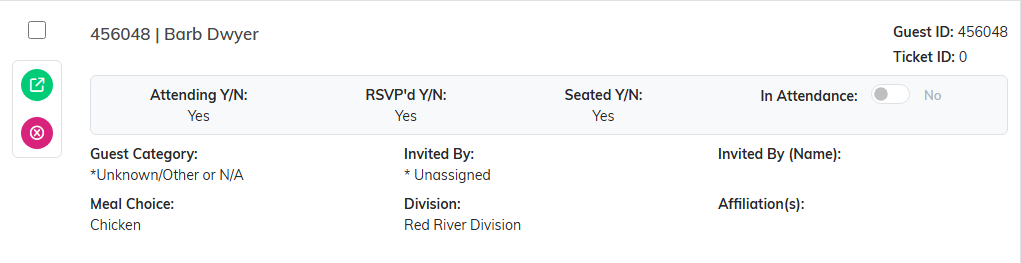
The switch on the row saves as you click.
To do a whole filtered set at once, use Select All Records That Meet The Current Filter Criteria first, then the mark action.
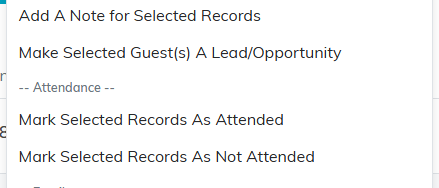
The bulk menu marks a whole selection at once.
Checking People In at the Door
For a ticketed event, you can check guests in at the door with a phone. Open the event's check-in page on any phone and scan each guest's QR code. It marks them checked in, keeps a live count, and warns you if a code has already been used that day. Scanning the ticket buyer's own code also switches their In Attendance on in the guest list; the codes for the rest of their party and for sponsorship seats do not, so mark those guests on the list if you want it complete. A guest without a ticket can be found and checked in by name on the same page, which switches their In Attendance on too. See QR Ticketing and Phone Check-In for Events.
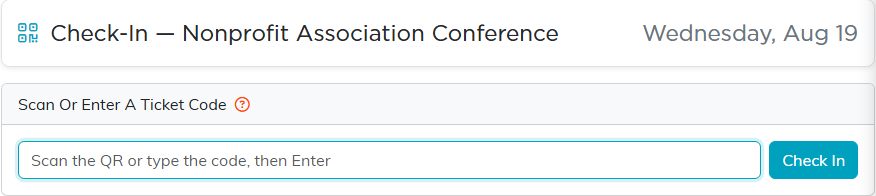
The check-in page works on any phone.
Walk-Ins
Click Add New on the Participant/Guest List page to add someone who did not register, then mark them attended like anyone else.

Add New puts a walk-in on the guest list.
Seeing Who Came and Who Did Not
The filter panel has separate dropdowns for Has RSVP'd, Is Attending, Is Seated, and Was In Attendance, each offering Both Yes & No, Yes, or No. Filter Was In Attendance to No and you have your no-show list; filter to Yes and you have your real turnout.

Was In Attendance set to No gives you the no-show list.
Keep the distinction straight. Attending is what someone said they would do. Attended is what actually happened. Reporting turnout off the RSVP figure is the usual way these numbers go wrong.
Where the Attending Answer Comes From
A paid ticket can show under Ticket Sales while the same person still reads as NO for Attending. Argenta fills Attending in when the guest answers for themselves on one of your public forms. When a staff member puts someone on the list instead, nobody has answered yet, so it stays at NO.
Attending is set to YES when:
- Someone buys on your public ticket sales form and is one of the guests on that ticket.
- Someone signs up on your public event registration form.
- You name a constituent as the guest on an existing ticket, from that ticket's own guests page.
- You promote an Additional Guest into a full guest record.
Attending stays at NO when:
- You record a sale by hand on the Add A Ticket Sale page. The ticket and the guest record are both created, but the buyer has not said whether they are coming.
- You click Add New on the Participant/Guest List page.
- You select constituents and run the Add To Event Participant/Guest List bulk action. It only appears for users with the Event Manager permission, and for Master Admins.
- You copy an event. The guests come across without their answers.
To answer it yourself, open the guest's own record and use Will This Guest Attend?, which offers NO, YES, and MAYBE. Attending is read-only on the guest list row, and the bulk actions cover Attended rather than Attending, so this one is set a guest at a time.

Will This Guest Attend? on the guest's own record. This one is still sitting at NO.
Getting the Numbers Out
- Export Attendance Sheet gives you a printable check-in sheet for the door: one row per guest with Prefix, First Name, Last Name, Email, Department, Associated Guest or Sponsor, and a blank In Attendance (initials) column to fill in at the door. It takes every guest who matches the filters and search you have on, across all pages, so clear them first to print everyone. It is limited to admins and users with export permission.
- Export to CSV exports the guest list itself, filters and all, for grant reports or a sponsor.

Two exports: the check-in sheet and the guest list itself.
Cleaning Up Afterwards
The bulk actions menu has Remove All Who Didn't Attend Event under the Danger Zone. It deletes those guest records rather than flagging them, so only use it when you are sure attendance is fully marked. It works on the whole event, so you do not tick any guests first, and it keeps every guest who holds a ticket even if they are not marked attended. Argenta tells you how many guests it removed, and says so plainly when it removed none. If you want to follow up with no-shows later, filter and export them first.
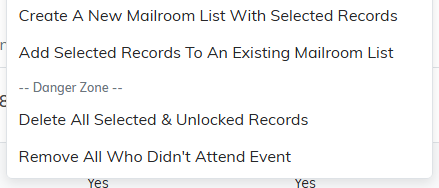
This one deletes the records. Be sure attendance is marked first.
