Knowledge Base Article
How to Create an Auction
Setting up a new auction takes a few minutes. Here's how.
Your auction does not open by itself, and setting a start time is not enough. The section called Open the auction to bidders, later in this article, lists the four things you have to do before anyone can bid.
Create the auction
- Go to Fundraising > Auctions in the left sidebar.
- Click Add A New Auction. Argenta asks for the Auction Title and the start and end Date and Time first. All of them are required, and nothing is saved until you go on.
- Click Add & Enter Details. The auction is created and the Auction Workspace opens on the Auction Details tab.
Each tab of the Auction Workspace has a short Show Me How To Use This Page video at the top right; click it to watch, and use its chapters to jump to the part you need.
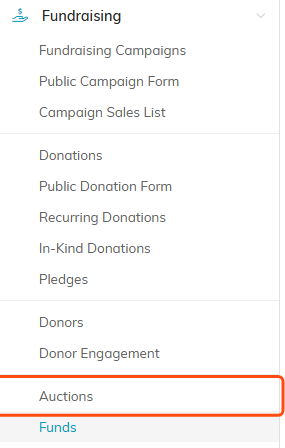
Start at Fundraising, then Auctions.

Add A New Auction sits below the filter bar.
Fill in the required details
These fields are marked with an orange asterisk:
- Auction's Current Status
- Auction Title (up to 140 characters)
- Auction Start Date and Auction Start Time, when bidding opens
- Auction End Date and Auction End Time, when bidding closes

Status and title are the first two required fields.

The start and end dates and times set when bidding opens and closes.
Set the time zone
The times you just entered are plain clock times. The Time Zone field underneath is what says which zone they are in, and bidding opens and closes at those times in that zone. A new auction, added or imported, starts on Eastern, so change it if yours runs somewhere else.
Set it deliberately, because the end time is not only when bidding stops. It is also when Argenta bills your winners, so an auction set to the wrong zone charges cards hours early or late. An auction with live items bills differently, and How to Run a Live Auction covers it.

The zone applies to the start and end times above it.
Add any optional details
- Auction Type and Auction Category to classify it
- The live auction settings: Silent Bidding Close Date and Time, First Bidder Number, Card Required For A Bidder Number, and Charge Silent Winners At The Silent Close. Leave them as they are unless you are running a live auction; How to Run a Live Auction explains each one.
- Fundraising Goal and Target Budget
- Auction Coordinator (Team Member)
- A webinar link, if you are hosting an online auction
- Chapter, Division, and Department (political teams also see District and Precinct)
Click Save All Changes & Continue to save and keep working, or Save All Changes & Exit when you are done.

Auction Type and Auction Category classify the auction. The orange plus (admins and master builders only) adds a new choice to either list.

The live auction settings. Leave them as they are unless you are running a live auction.

Set a goal and a budget, and name the team member running it.

Hosting the auction on a webinar? Drop the link here.

Chapter, division and department tie the auction to your org structure.

Save and continue to keep working, or save and exit when you are done.
Finish setting up your auction
Use the workspace tabs to build out the rest:
- Auction Items: add the items up for bid.
- Connections: link the auction to a campaign and an event.
- Public Form Design: design the public bidding page with a banner image and an intro description.
- Sponsorships: record your sponsors.

The workspace tabs run across the top of the auction.
Open the auction to bidders
Nobody can bid until all four of these are true. If even one is missing, bidding stays shut.
- On the Auction Details tab, turn on Make Auction Public.
- On the same tab, set Auction's Current Status to Bidding Open, then click Save All Changes & Continue. Argenta never does this for you. The status stays where you left it, even after the start time comes.
- Wait for the start date and time. Until then, bidders can look but cannot bid, even with the status set to Bidding Open.
- On the Auction Items tab, make sure each item has Display On Public Form turned on. An item without it never appears online. Live auction items never appear online either; they are sold in the room.

Make Auction Public sits with the record level permission switches.
To send bidders to the auction, click Public Forms at the top right of the auction, then click Copy Public Auction Form Link and paste the link into your email or post. To see the page the way your bidders do, click Open Public Auction Form instead.
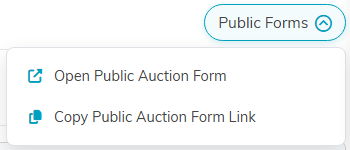
Public Forms gives you the link to send to bidders.
What your bidders see
Open the link yourself before you send it. What you see is what your bidders see:
- If Make Auction Public is off, the page says This auction isn't available. Nothing about the auction shows.
- If Make Auction Public is on but the status is New, Pending Approval or In Planning, the page shows the auction's title and dates with Bidding Has Not Opened Yet where the View All Auction Items button should be. With any other status except Bidding Open, it shows Auction Is Closed there instead. Either way, bidders cannot register or bid.
- If the status is Bidding Open but the start time has not come yet, bidders can click View All Auction Items and look around, but every item says Bidding Is Not Open. Nobody can bid early, but they can already press Register to Bid on the auction page to put a card on file and get their bidder number.
- Between the start time and the end time, each item offers Register a Card to Bid, and bidders can bid.
- After the end time, bidding stops and the auction page says Auction Is Closed.
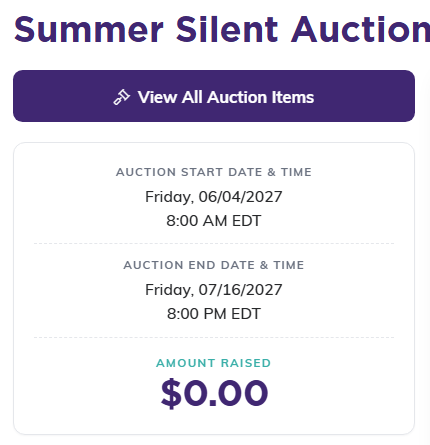
With the status set to Bidding Open, bidders get the View All Auction Items button.
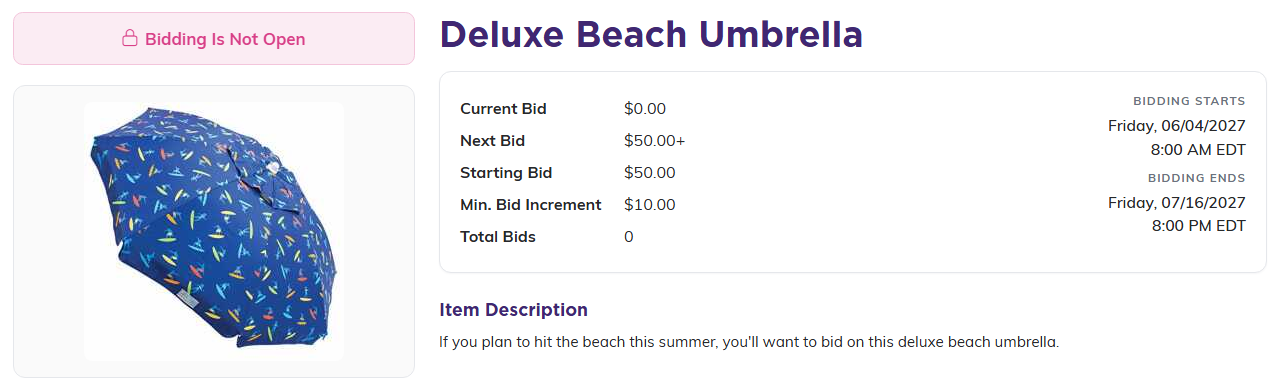
Before the start time, every item says Bidding Is Not Open, even though the status is Bidding Open.
What happens when your end time arrives
You do not close the auction yourself. At the end date and time Argenta stops the bidding, marks every bid-on item sold at its current bid, assigns each one to its highest bidder, and moves the auction's status to Complete.
Changing the status does not stop this. Argenta closes the auction at the end time unless its status is On Hold or Canceled. To stop an auction from closing and charging its winners, set one of those statuses before the end time. Turning off Make Auction Public is not enough once bids are in: it only takes the public page down. An auction that is not public and has no bids is left alone.
You cannot set the status to Complete yourself while any silent item has bids that have not been awarded, or while a silent item winner has not yet been charged or sent their invoice. To stop bidding early, choose Bidding Closed instead: bidding stops, the winners are still awarded and billed when the auction closes, and the status moves to Complete for you. If those winners should not be billed at all, choose Canceled.
It then raises one invoice per winning bidder and charges the card that bidder saved when they registered. Anyone whose card is declined, or who has no usable card, is emailed a link to pay instead.
