Knowledge Base Article
How to Track Skills and Competencies
Skills record what a person can do, so you can find the accountant, the nurse or the Spanish speaker when you need one.
Adding a skill
- Open the person and click Skills & Experience in the workspace menu.
- On a volunteer, member, staff member or board member record, click Assign A New Skill, then pick one from the Skill list. On a constituent or participant record the Add Skill list is already showing.
- Click Add.
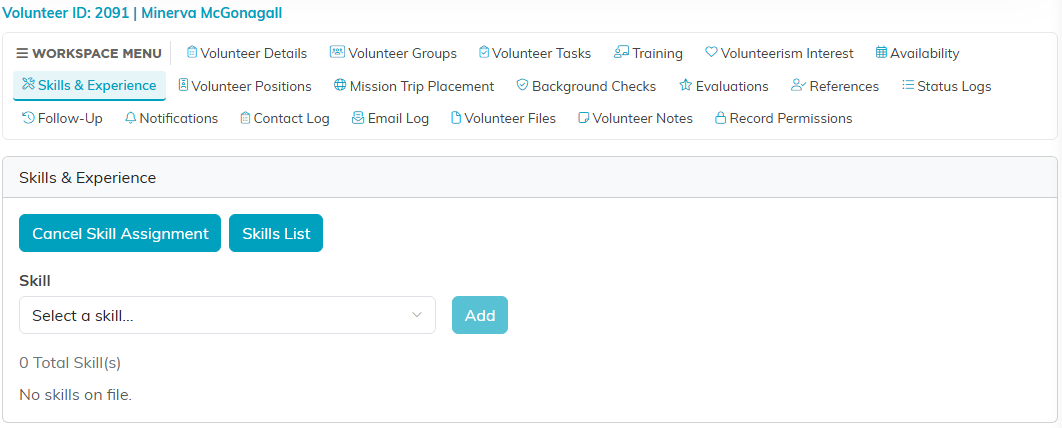
Skills & Experience on a volunteer, with the Skill list open.
Each skill is listed underneath, and the pink icon on a row removes it. The list only offers skills the person does not already have, so you cannot add the same one twice.
A skill is the skill and nothing else. There is no proficiency rating and no note against an individual skill, so anything about how experienced somebody is belongs in the constituent's notes.
One list, shared across every record
This is the part worth knowing. A person has a single skills list. The Skills tab on their volunteer, member, staff member, board member and participant records all read and write that same list.
So a skill added on the volunteer side shows on the staff side, and deleting one deletes it everywhere. There is no separate set of volunteer skills to keep apart from staff skills.
Setting up the choices
The list comes from the Constituent Skill classification code, which you manage on the Classification Codes page. The Skills List button on a volunteer, member, staff member or board member's skills tab opens it. Whatever you add there is what everyone can choose from, so the grouping is yours to design: trades, languages, professional qualifications, whatever you actually recruit for.
Keep it short enough that people pick honestly. A list of two hundred skills gets skimmed, and a skimmed list is worse than a short one because you will trust it.
Finding people by skill
See How to Track Skills and Find People by Expertise, which covers searching on them.
Worth doing
- Ask at intake, while somebody is already filling a form in.
- Add the skill to the classification code once rather than letting people describe the same thing three ways.
- Revisit after a certification, since nothing prompts you.
