Knowledge Base Article
How To Make Your First Argenta Payment
Your first Argenta payment does two things at once: it pays your subscription, and it saves your card so the months that follow are charged automatically.
Before you start
You need to be signed in as a Subscription Admin or a Master Admin. Those are the only roles that can open Subscription Settings and make a payment.
Make the payment
- Click Settings (the gear icon in the top right of Argenta), then choose Billing & Payments.
- On the Subscription Payments card, click Pay Subscription Fee. The Argenta subscription payment form opens in a new browser tab.
- Check the details on the form:
- Organization Name. Filled in for you, and not editable here.
- Email Address. Required. Your receipt goes to this address, so change it if the one shown is not where you want it.
- Subscription Type. Filled in for you, and not editable here.
- Payment Amount. Already filled in with your monthly fee. Leave it as it is unless Argenta has asked you to pay a different amount. Paying the monthly fee shown is what saves your card. It also moves your due date forward a month when a payment was due, or sets your first due date a month from today if you do not have one yet. Paying early, before your due date, leaves the date where it is. A different amount is still recorded as a payment, but your card on file and your due date stay as they were until Argenta staff update them.
- Click Pay with Stripe. A card entry panel opens on the right.
- Enter your card details, then click the Pay button. It shows the exact amount you are about to be charged.
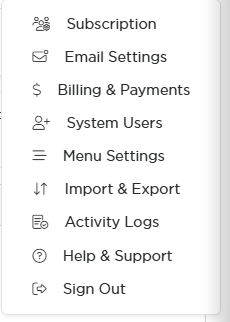
Billing and Payments is the third item on the Settings menu.
What happens next
You land on a Payment Receipt screen with your organization name, transaction type, payer's name, payment date, amount, and payment method. A full receipt is emailed to the address you entered within a few minutes. If you do not see it, check your spam folder.
When you paid the monthly fee shown, the card you used is saved against your subscription so Argenta can charge your monthly fee automatically from here on. You only need to go through this once.
See your payments later
Go back to Settings > Billing & Payments any time. Every subscription payment is listed with its payment due date, payment date, subscription type, and billing method, and each row has a download icon that pulls the receipt for that payment.
To put a different card on file, see Adding A Payment Method for An Argenta Subscription.
