Knowledge Base Article
How To Set Record Level Permissions
Sometimes one record needs protecting even though everyone involved has every right to be working in that module: a sensitive donor, a personnel matter, a grant that is not public yet. Record-level permissions handle that single record without changing anybody's account.
Any record in Argenta can be locked or set to view only, and every record workspace has a Record Permissions page where you name the people the restriction should not apply to.

Every record workspace carries a Record Permissions page in its menu.
The two settings
- Set As View Only. People can open the record and read it, but cannot change it in any way.
- Lock This Record. People cannot view or update it at all.
Either way, three groups keep full access:
- The person who created the record.
- Master admins.
- Anyone given specific permission on that record's Record Permissions page.

The two switches sit side by side under Record Level Permissions.
Protect a record
- Open the record and stay on its details page.
- Near the top you will find Set As View Only and Lock This Record. They are switches, so one click is enough.
- Save the record. On a campaign sale the two switches take effect as soon as you click them, so there is nothing further to save.
A locked record shows a lock icon beside it in lists, so your team can see at a glance that it is protected. What a list holds back, it holds back only from someone the lock refuses: the creator, Master Admins and anyone named under Locked Record Access still see the whole row. On the Constituents, Donors, Grantors, Leads, Members, Volunteers and Voters lists, someone the lock refuses sees only the padlock, the ID and the name, plus the type and status on the Constituents list; the person's contact and personal details stay hidden. On the Members Archive list, a locked row keeps its padlock, ID and name but drops the email, address, phone numbers, deceased status, date of birth, age and sex. On the Mission Trip Enrollments, Mission Trip Facilities and Program Sponsorships lists, a locked row keeps its padlock, ID and name but drops the email, address and phone numbers. The Parents list keeps a locked parent's padlock, ID and name and leaves out the email and home address. On the Master Constituents Filter report, a locked constituent shows only its padlock, name, ID and status, cannot be edited there, and comes out the same way in the report's CSV and PDF. Other reports that list people work the same way, on screen and in every export they offer, whether CSV, Excel or PDF: a person whose record is locked to you keeps their ID, name and the report's own figures, such as their giving, hours or dates, and their contact and personal details are left blank. The Tasks and Mission Trips lists show a locked row as just its padlock, ID and title. On the Tasks list, a task locked to you also matches a search only on its ID or title, drops out when you filter on a field it hides, and does not count toward the Hours and Billing totals; the Billable Tasks, Task History and Task Aging reports leave it out. So do the Volunteer Tasks list, the Volunteer Task Calendar (still at its date), the Volunteer Task Groups list, a volunteer's Volunteer Tasks tab and a task group's Tasks tab, where a locked task cannot be edited or saved either. On the Volunteer Task Group Roster report, a locked volunteer task shows only its padlock, ID and title, with its public status, dates, hours and volunteer left blank on screen and in the CSV and PDF; the task group's own details, such as the organizer and location, still show. The Materials Inventory list shows a locked item as just its padlock, ID and name. On an auction's Auction Items list, a locked auction item shows only its padlock, name and ID, and on the auction's Bidding tab each bid on that item shows only the padlock and the item's name and ID. On the Auction Bidder Statements and Auction Results reports, a locked item keeps its padlocked name, and Auction Results its type, category and channel too, while its amounts, bids, sale price, winner, fair market value and deductible are left out on screen, in the exports and from every total; the CSV lists it by name with its ID in a Locked Record ID column. Print Bidder Statements leaves out any statement that carries a locked item and says how many it left out. The Event Ticket Sales list, an event's Ticket Sales tab and a constituent's Event Tickets list show a locked ticket sale as just its padlock and ticket ID. On the Fiscal Donations list, the Gross and Net totals leave out donations that are locked to you. On a donor's Fiscal Donations and Material Donations tabs, a gift locked to you shows only its padlock and ID. The Recurring Donations list shows a locked recurring donation as just its padlock and ID, leaves its amount out of the total, and finds it only by its ID. On the Expense List and an auction's Actual Expenses tab, an expense locked to you shows only its padlock and ID; it still counts toward the number of expenses, but its amount is left out of the total. A search finds it only by its ID, and any filter you set leaves it out. The Expense Details By Category, Expense Details by Payee, Expenses by Category Pie Chart, Expenses by Team Member Pie Chart, Expenses Monthly and Fund Expenses Detail reports leave it out altogether, totals and exports included. The Withdrawals list treats a locked withdrawal the same way: only its padlock and ID, its amount left out of the total, found only by its ID, and left out while a filter is set. On the Client Invoice Details report, a locked invoice keeps its number, client, date and status, but its items and amounts are withheld on screen and in every export, and the totals leave it out and say how many locked invoices they leave out. On the Grant Applicants, Vendors and Renters lists, and an auction's Bidders tab, the email is left off a locked row for anyone the lock refuses, and the Board Members list leaves off the email and the deceased note. On the Tasks board, calendar and timeline, a locked task shows as its padlock, number and title, still at its dates on the calendar and timeline and grouped under Locked on the timeline, and opening it tells you the record is locked. A search there finds a locked task you cannot open only by its number or title, and while an Assigned To, Client or Category filter is set, the task is left out. Projects go further, because where a project sits would give away its status and dates: on the Project Board a locked project you cannot open sits in its own Locked column at the end, the Project Calendar leaves it off altogether, and the Project Timeline lists it under Locked Projects with just its padlock, number and title. The Grant Pipeline keeps a locked grant you cannot open in its stage column as its padlock, number and title; its grantor, amounts and deadline are left off the card and out of Pipeline Value, Awarded and the column totals, and it cannot be dragged to another stage. Someone the lock refuses cannot copy the record either: Copy on its list row is refused with a Cannot Copy message, so a locked record cannot be lifted out by copying it. The creator, Master Admins and anyone named under Locked Record Access can still copy it. Deleting a locked record is refused from the list and from the workspace alike, because both routes run the same check. To delete one, open it, untick Lock This Record, save, and then delete. A Master Admin can delete a locked record without unlocking it first.
Bulk actions on a list that change the selected records themselves, such as adding a note or an engagement, changing a classification code or assigning a team member, skip the ones that are locked, or set to View Only for you, unless you are a Master Admin, and tell you how many they skipped. The same goes for Add To Constituent Group, Add To Event Participant/Guest List, and adding people to a Mail Room list. The group itself is checked too: Add To Constituent Group offers only the groups you can open, and Argenta will not add people to a group that is locked or view only for you. Bulk Campaign Notes works the same way, listing only the campaigns you can open and adding no notes to the leads of one that is locked to you.
A record set to view only cannot be deleted from a list either. Argenta refuses the delete and tells you that the record is set to view only, so it cannot be deleted. The same three groups above are unaffected and can still delete it.
For anyone locked out of it, a locked record still appears in the list with its padlock, and in the Export to CSV file it keeps only its ID and name, every other cell blank. A Locked Record ID column is added to the file to name it, so they can ask their admin for access. Master admins and anyone named on the Record Permissions page still get the full row in their export. A locked record you created yourself comes through in your own export, on every list.

On any record, the switches sit at the top of the details page.

A locked record carries a padlock beside its name in every list.
Grant access to a locked record
- Open the record and go to its Record Permissions page.
- Find the Locked Record Access section on the right.
- Start typing the user's name in the Add User box and choose them from the list.
- Click Add. They appear in the list below and can now open the record.
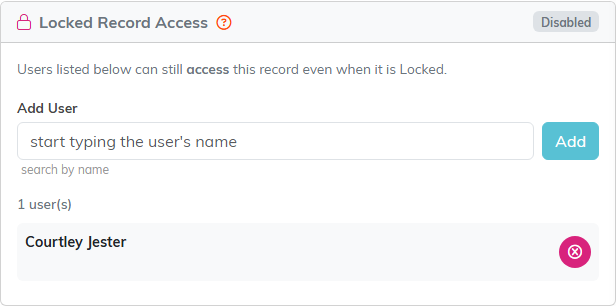
Locked Record Access sits on the right of the Record Permissions page.
Grant access to a view-only record
- Open the record and go to its Record Permissions page.
- Find the View Only Access section on the left.
- Start typing the user's name in the Add User box and choose them from the list.
- Click Add. That person can now modify the record.
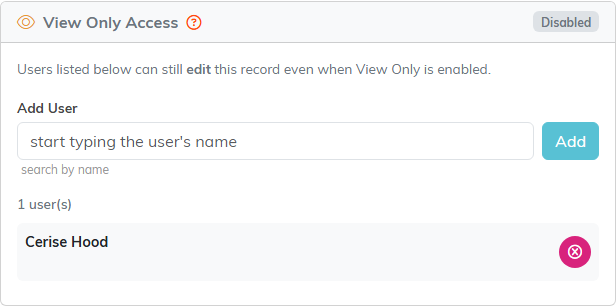
View Only Access sits on the left, and works the same way.
Remove someone's access
In either section, click the remove icon next to the person's name in the list. That works the same way for locked records and view-only records.

The pink button at the end of the row takes the person back off the list.
When to use something else
Record-level permissions are for exceptions, one record at a time. If somebody should be restricted across the board, that belongs on their user record instead, where you can make them view-only everywhere or limit them to particular chapters, divisions, departments, or precincts. See What are User Roles and Permissions in Argenta?
