Knowledge Base Article
How to Connect a Volunteer Task to Sessions and Programs
A single volunteer shift often belongs to something bigger: the event it works at, the conference session it supports, the program its volunteer comes from, the property it takes place at. The Connections page of a volunteer task ties the task to those records, so you can open any of them straight from the task.
Open Connections
Open the volunteer task and click Connections in the workspace menu. To the right of the task's name is a short Show Me How To Use This Page video for this page, with a chapter for each part below.

The workspace menu of the morning registration desk shift.
The page has six panels: Associated Event Sessions, Associated Events, Associated Expenses, Associated Participants, Associated Programs and Associated Properties. The number beside a panel's title counts its connections.
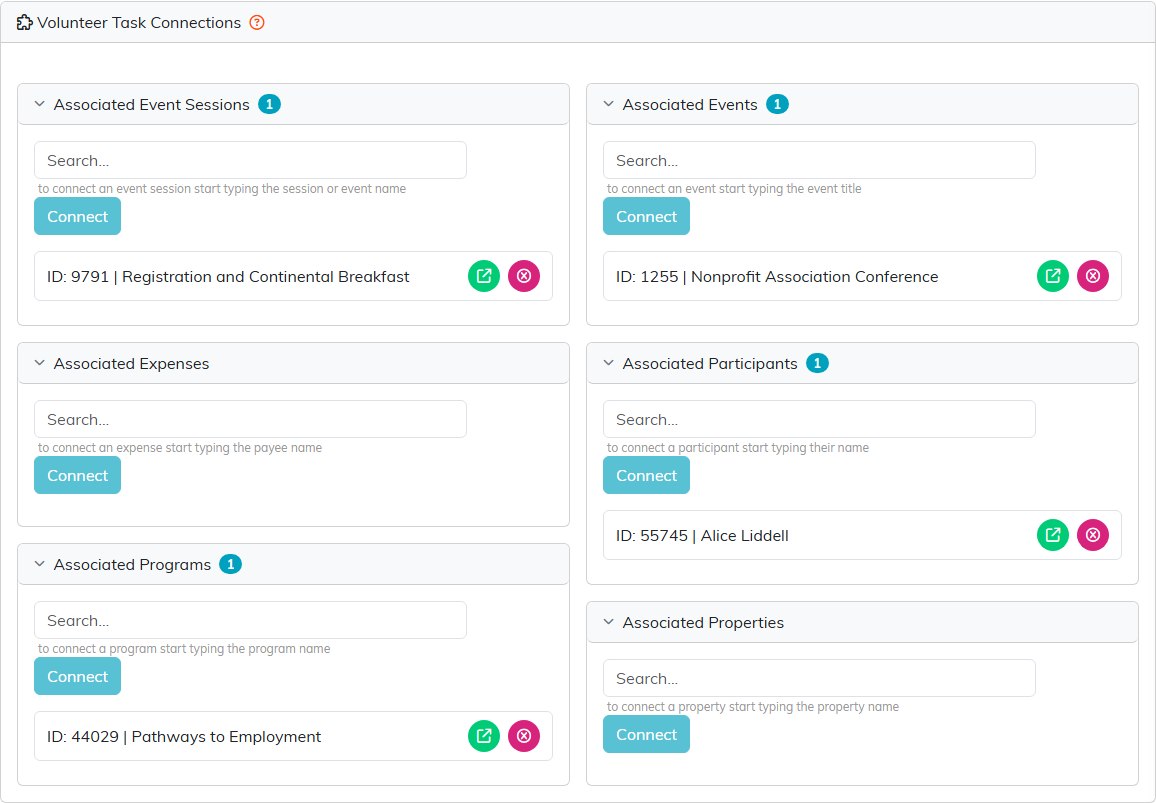
The registration desk shift, connected to the session it staffs, the conference itself, a program participant and her program.
Connect a record
- In the panel you need, start typing in the Search box. Search events by title, sessions, participants, properties and programs by name, and expenses by payee. Sessions can also be found by their event's name, and each session match shows its ID, start date and time, name and event, so sessions with the same name can be told apart.
- Pick the record from the list.
- Click Connect.
Open or remove a connection
- To open the connected record, click its green icon.
- To remove the connection, click its pink icon. Only the link goes. The event, session, participant, property, expense or program stays in Argenta.
Use Associated Events when the shift works the event as a whole, and Associated Event Sessions when it staffs a particular session; a shift can have both. A task connected to an event also shows on that event's own Connections page, under Associated Volunteer Tasks, and you can connect it from there too.
Links that apply to every shift in a task group belong on the group instead; see How to Connect a Volunteer Task Group to Sessions, Programs and Participants.
