Knowledge Base Article
What is a Mail Room List?
A mail room list is a saved collection of constituents that you can use as the recipient group for batch email sends in Argenta. Instead of sending an email to one person at a time, you select a mail room list and Argenta sends the email to every eligible person on that list.
Key characteristics:
- Mail room lists are managed in the Mail Room section of Argenta
- Each list contains constituents who meet certain criteria or were manually added
- When you send to a mail room list, Argenta automatically skips recipients who have opted out of email or do not have an email address on file, and shows you how many before you send
- You can schedule batch sends for a specific date and time, or send immediately

Lists are built and kept on Manage Mailing Lists.
How mail room lists relate to merge tags:
When you send an email template with merge tags to a mail room list, Argenta processes each recipient individually. Every person on the list receives a uniquely personalized email with their own data replacing the merge tag placeholders. For example, if your template contains [FirstName] and your list has 200 people, all 200 emails will have the correct first name for each recipient.
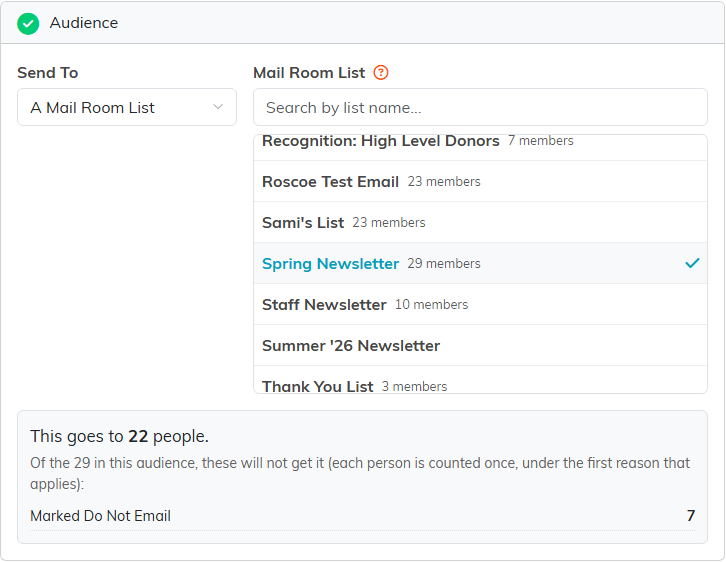
On New Campaign, A Mail Room List picks the list as your audience.
Where to find it: Navigate to the Mail Room from the main menu to create and manage your mail room lists. To send an email to a list, click Send Email in the Mail Room, or Use This Template on a template, then choose A Mail Room List under Send To.
