Knowledge Base Article
What is an Email Merge Tag?
An email merge tag is a placeholder that you insert into an email template to personalize the content for each recipient. Merge tags use the format [TagName] with square brackets, such as [FirstName], [TotalDonated], or [OrganizationName].
When the email is sent, Argenta automatically replaces each merge tag with the actual data from the recipient's record. This means you design one template, but every recipient receives a uniquely personalized email.
How they differ from static content:
- Static content: "Dear Supporter, thank you for your donation." Every recipient sees the same text.
- With merge tags: "Dear [FirstName], thank you for your donation of [LastDonationAmount]." Each recipient sees their own name and donation amount.
Argenta provides merge tags in these groups: Contact Info, Mailing Address, Organizational Segments, Donations, Membership, Volunteerism, and Event / Program. The Event / Program group is the exception: its tag [EventName] fills only when the email is sent from an event, so on a Mail Room list send it comes out blank. Merge tags work in both the email subject line and the body, and they work for single sends and batch sends to mail room lists.
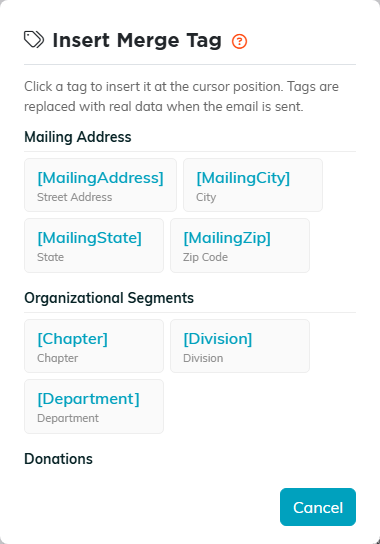
The merge tag picker, showing the tag groups.
Tags are inserted using the merge tag picker button in the Email Template Workspace editor toolbar, or by typing them manually with the exact tag name in square brackets. A tag can also carry fallback text for anyone with no value, after a bar: [FirstName|Friend].

The merge tag picker button in the Email Template Workspace toolbar.
