Knowledge Base Article
How do I add a personalized greeting to an email using merge tags?
You can create personalized greetings using merge tags in your email template body. Here are several approaches:
Simple first-name greeting:
- Type at the top of your email: Hi [FirstName],
- Result: "Hi Sarah,"
Formal greeting with salutation:
- Type: Dear [Salutation] [LastName],
- Result: "Dear Ms. Johnson,"
Warm greeting with nickname fallback:
- Type: Hello [FirstName],
- Or if nicknames are well-maintained: Hello [Nickname],
- Result: "Hello Sarah," or "Hello Sally,"
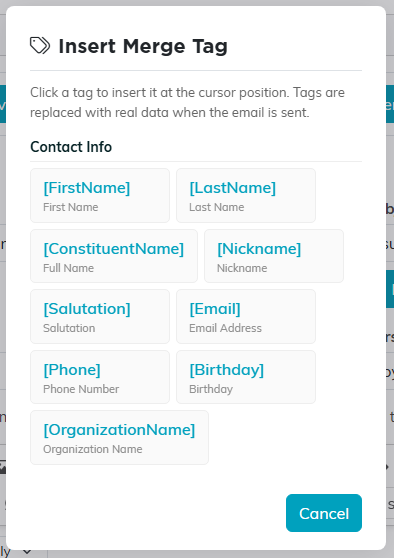
The greeting tags all live in the Contact Info group.
Best practices for greetings:
- The [FirstName] tag is the most reliable, and not only because most records have a first name: it is the one tag that never comes out blank. Argenta uses the nickname when there is no first name, and the word Friend when there is neither, so the greeting always reads properly
- If you use [Salutation], be aware that not all records have a salutation on file. If missing, the greeting will read "Dear Johnson," which may look awkward. Give it fallback text after a bar, such as
[Salutation|Friend], which reads Friend for anyone with no salutation on file. - The [Nickname] tag only works when a nickname has been entered on the constituent record. If no nickname exists, it will be blank.
- For donor-specific emails, you could include something like: [FirstName], your generous giving of [TotalDonated] has made a real impact!
