Knowledge Base Article
Do merge tags work with batch email sends to mail room lists?
Yes! Merge tags are supported for batch email sends to mail room lists, with one exception: the Event / Program group. Its tag [EventName] needs a send that came from an event, so on a Mail Room list send it comes out blank. In fact, batch sending is where merge tags are most powerful because every recipient receives a uniquely personalized version of your email.
How it works:
- You design your email template with merge tags in the body and/or subject line
- You click Use This Template, which opens the template on the New Campaign page
- Under Send To you choose A Mail Room List and pick your list, then choose when it goes
- When you click Send and confirm, Argenta processes each recipient individually
- For every person on the list, the system fetches their personal data from the database and replaces the tags, creating a unique version of the email for each recipient
- Each personalized email is placed into the email queue for delivery
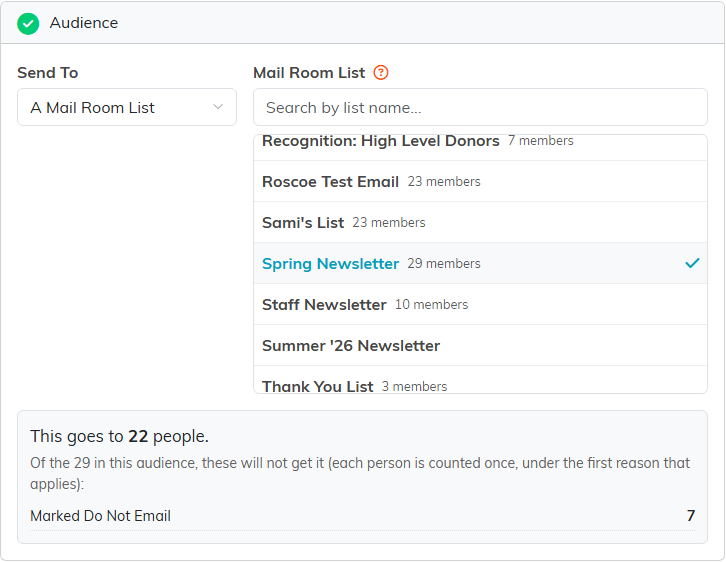
Pick the list on New Campaign, and the count appears before you send.
Performance note: Argenta is optimized for batch sending with merge tags. If your template does not contain any merge tags, the system detects this before the send loop begins and skips the extra data lookups entirely, keeping batch sends fast. Templates that do contain merge tags add a small amount of processing per recipient, but since emails are queued asynchronously, you will not notice a delay.
Skipped recipients: Anyone on the list who cannot or should not get the email, such as people with no email address or who have unsubscribed, is skipped. The Audience step lists them, with the reason, before you send. To check how the tags read for a particular person, use Preview As on the same page.
