Knowledge Base Article
How to find volunteers who could become donors using the Engagement Report
People who give you their time and have never been asked for money are some of the warmest prospects you have. The Constituent Engagement Score Report is a good way to find them.
Build the list
- Open Report Center at the top right, then Constituent Reports, then Constituent Engagement Score Report.
- Set Time Period to Last 12 Months, or Last 24 Months if your volunteer program is seasonal.
- In Filter by Activity Type, select Volunteering.
- Click Run Report.
- Read down the results for people whose V badge is strong and whose G badge is zero. The activity icons make this quicker: you want the Volunteer icon lit and the Donor icon dark.
Worth being clear about one thing: the activity filter can only include, not exclude. Selecting Volunteering and leaving Giving unselected does not remove donors from the list, it just does not filter on giving. The people you want are found by eye in the results, or by exporting and sorting the giving column in a spreadsheet.
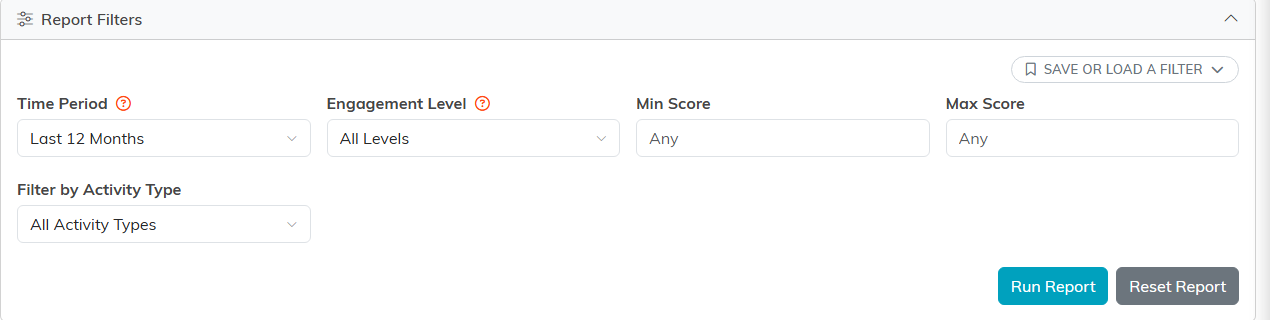
The filters: time period, level, a score range, and activity type.
Which ones to approach first
- High volunteer hours, which is real commitment measured in time.
- Active volunteer status, so the relationship is current rather than historical.
- Event attendance on top of volunteering, which says they like being around your work.
- Email opens and clicks, which say your messages are already getting through.
Someone showing all four is about as warm as a first-time ask ever gets.
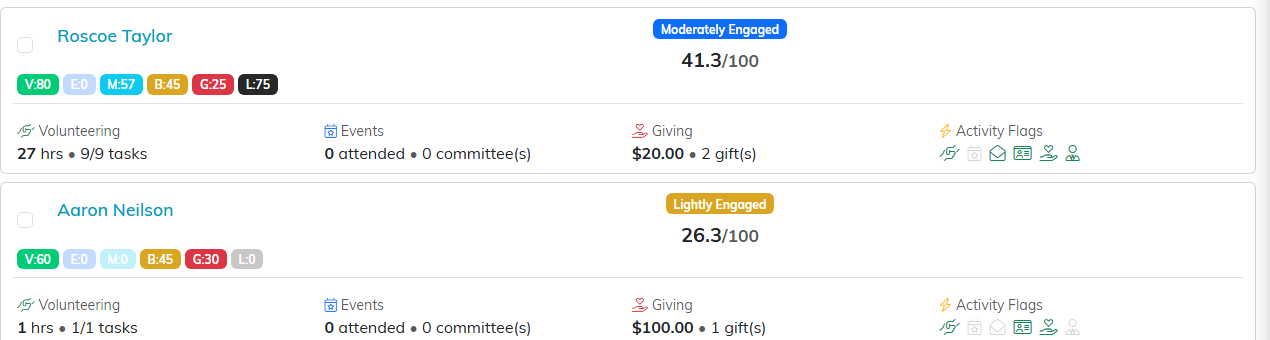
Each row shows the six dimension chips, the band, and the score out of 100.
Turn it into an ask
- Export To CSV if you want to work the list in a spreadsheet or hand it to a colleague.
- Tick the people you want and use the bulk actions to create a Mail Room mailing list for a targeted appeal.
- For your strongest few, a personal ask from the staff member who runs their volunteer program will beat any mailing.
- Frame the ask around what they already do with you. They have seen the work up close, so you are asking them to add to something they are part of, not explaining your mission from scratch.

Both exports carry whatever your filters left on screen.
The same trick elsewhere
The pattern works for any activity type. Select Events to find regular attendees, Membership to find members, or Email to find people who reliably open your messages, then look for the ones with a zero giving score.
More on how the filter behaves: How to Filter by Activity Type in the Engagement Report.
