Knowledge Base Article
Where to Find the Constituent Engagement Score Report
Here is how to get to the Constituent Engagement Score Report.
Open the report
- Click Report Center in the links across the top right of the screen. It is not in the left menu, and it shows only for administrators and users with the Report Manager permission. Without it you can still open the report at /reports/constituent-engagement if you are a Marketing Manager, Donation Manager or administrator.
- Click the Constituent Reports category card.
- Choose Constituent Engagement Score Report.
The direct address is /reports/constituent-engagement if you would rather bookmark it. Clicking the heart beside the report name puts it in My Favorite Reports, which is quicker still.
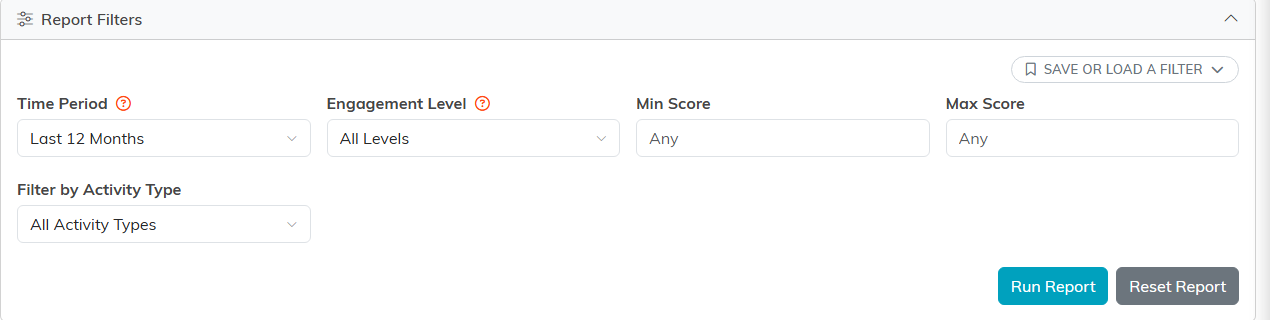
The filters: time period, level, a score range, and activity type.
Who can open it
- You need the Marketing Manager, Donation Manager, or Admin role to open the report at all.
- Exporting needs the Can Export Lists To Excel permission or Admin. Without it the report runs fine, you just will not see the export buttons.
- If your account is limited to certain chapters, divisions, departments, or precincts, the report only counts constituents you are allowed to see.
What you can do once you are in
- Score every active constituent across volunteering, events, email, membership, giving, and leadership.
- Filter by time period, engagement level, a minimum and maximum score, and activity type.
- Export the results with Export To CSV or Export To PDF.
- Select people from the results and build a Mail Room mailing list from them.
- Click any constituent's name to open their record in a new tab.
Results always come back sorted by engagement score, highest first. There are no column sort controls, so use the Min Score and Max Score filters when you want to work through a particular band.
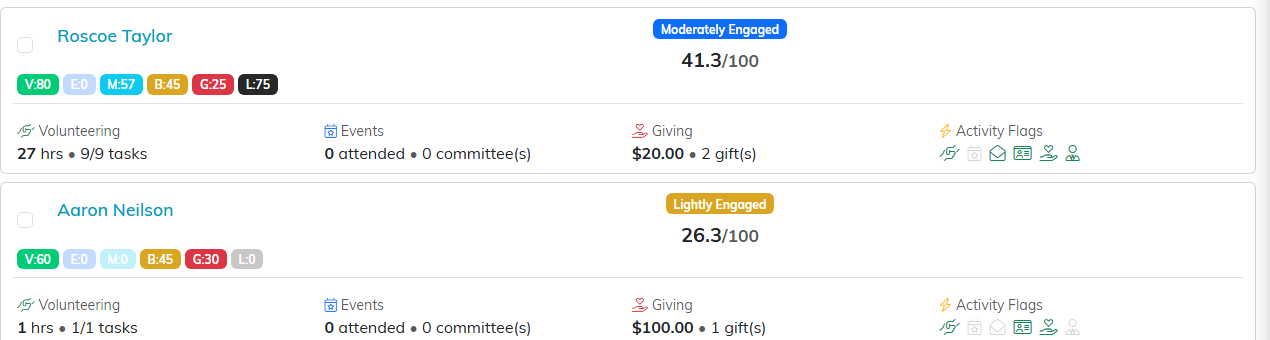
Each row shows the six dimension chips, the band, and the score out of 100.
Reports that pair well with it
- RFM Donor Segmentation Report in Fundraising Reports, for a deeper look at donor behavior.
- Lapsed Donors (LYBUNT) Report in Fundraising Reports, for people who gave last year but not this one.
- Volunteer Service Hours Report in Volunteer Reports, for the detail behind a volunteer score.
For what the score actually means, see What is the Constituent Engagement Score Report.
