Knowledge Base Article
How to Sort Documents in the Document Library
To change the order documents appear in the list:
- Navigate to Workflow & Productivity > Document Library
- Find the Sort by dropdown above the list
- Choose what to sort on:
- Document ID - the order documents were added, and the one the list opens on
- Date Posted
- Document Name - alphabetical
- User Who Posted
- Set the direction with the arrow button beside it: arrow up is Ascending, arrow down is Descending. The list opens on Document ID, Descending, so the newest documents are at the top
- The list reorders as soon as you choose
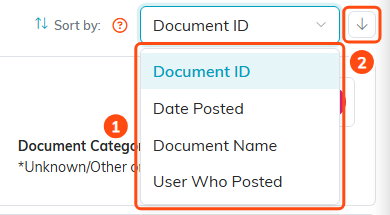
1. The Sort by list. 2. The direction arrow, pointing down for Descending.
That dropdown and the arrow are the whole of it. The column headings in the list are not clickable, and there is no sort by category - use the Category filter instead if you want one category at a time.
