Knowledge Base Article
How to Insert Special Symbols and Characters in the Content Editor
The Insert Symbol button opens a panel of special characters. Put the cursor where the symbol should go and click one to insert it.
Like the emoji picker, it is one flat panel with a fixed set and no search. Scroll inside the Insert Symbol box to see the rest, or click Cancel to close it without inserting anything.
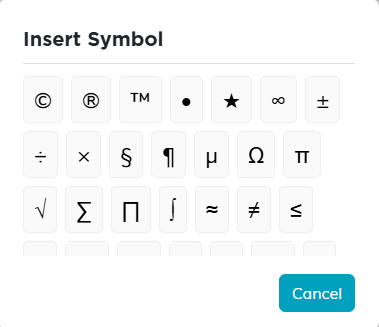
What is in it
- Copyright, registered and trademark: © ® ™
- A bullet and a star: • ★
- Everyday marks: § ¶ µ ± × ÷
- The two Greek letters that turn up in ordinary writing: Ω π
- Arrows in every direction, single and double: ← ↑ → ↓ ↔ ⇐ ⇒
- A large set of mathematical and set-theory symbols: √ ∞ ≠ ≤ ≥ ≈ ∑ ∏ ∫ ∈ ∪ ∩ ⊂ ⊃ and many more.
What is not in it
No currency symbols, so no euro, pound, yen or cent. No fractions, so no one-half or one-quarter. No degree sign. For any of those, type them from your keyboard or paste them in from elsewhere.
