Knowledge Base Article
How to Insert Emojis in the Content Editor
The Emoji button on the toolbar is the smiley face. Put the cursor where the emoji should go, click the button, then click an emoji to drop it in.
It is one flat panel holding a fixed set. There are no categories and no search box, so scan the panel rather than looking for a way to filter it.
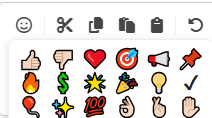
An emoji goes in as an ordinary character, so you can select it, delete it or copy it like any other text.
How an emoji looks comes from the reader's own device. A few of the newer hand gestures in the panel show as empty boxes on older computers whose emoji font does not have them yet, and an email reader on such a computer sees the same box.
