Knowledge Base Article
What is the Document Manager in the Content Editor
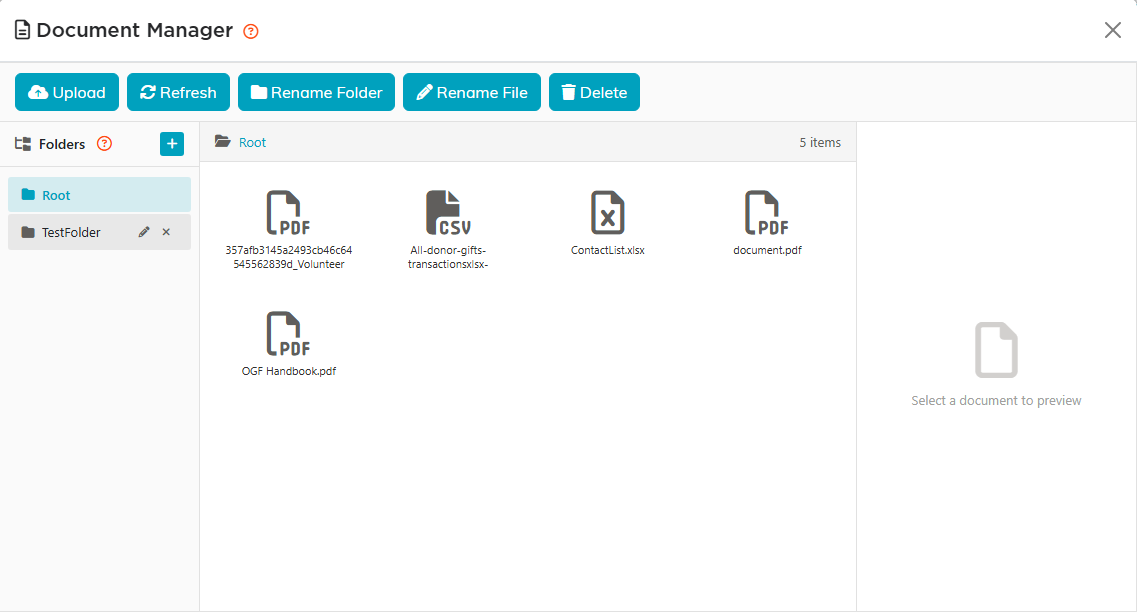
The Document Manager is the shared library for everything that is not a picture, opened from its own button on the content editor toolbar. Insert Document puts a link into what you are writing, and the reader opens the file from there.
What it takes
PDFs, Word, Excel and PowerPoint files, plus text, archives and data files: .pdf .doc .docx .xls .xlsx .ppt .pptx .txt .zip .rar .csv .rtf .odt .ods .odp .xml .json .html .htm, up to 50 MB each. Pictures go through the Image Manager instead, which has its own 4 MB limit.
Using it
- Selecting a file shows its type, its size and when it last changed, so you can be sure it is the current one.
- Folders work as they do for pictures: the plus sign makes one, drag a file onto a folder to move it, hover a folder for its rename and delete buttons, and Root cannot be renamed or removed.
- Files belong to the whole team, so one upload serves every page that needs it.
What stops you breaking something
- Renaming or moving a file updates the places that link to it, and tells you how many it changed.
- Deleting a file that is still in use shows you where it is used first. The list separates Direct, where a record stores the file by name, from Embedded, where it sits inside something else such as an email body. Delete Anyway leaves all of those pointing at nothing. A file nothing uses still asks you to confirm before it is deleted.
- Deleting a folder takes everything inside it and cannot be undone.
- Replacing a file keeps the name, so everywhere already linking to it picks up the new version. The old one is gone the moment you replace it.
