Knowledge Base Article
How to Create Bulleted and Numbered Lists in the Content Editor
The bulleted and numbered list buttons sit together on the toolbar.
- Put the cursor where the list should start.
- Click the Bulleted List or Numbered List button.
- Type an item and press Enter for the next one.
- Press Enter on an empty item, or click the button again, to come out of the list.
Changing how a numbered list counts
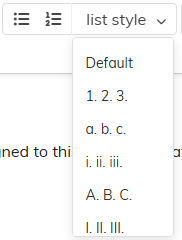
Put the cursor in the list and use the list style dropdown beside the list buttons. It offers Default plus five:
- 1. 2. 3.
- a. b. c.
- i. ii. iii.
- A. B. C.
- I. II. III.
It changes only a numbered list; with the cursor in a bulleted list it does nothing. In a nested list it changes the level the cursor is on.
Indent and Outdent on the toolbar move an item in or out a level, which is how you nest one list inside another.
