Knowledge Base Article
How to Change Font Style and Size in the Content Editor
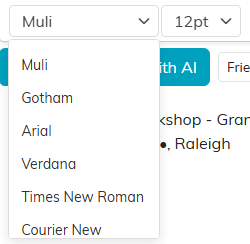
Font and size are the two dropdowns at the end of the toolbar, after the color picker. Select your text first, then choose from the dropdown.
Font Name
Seven, and no more: Muli (the one shown by default), Gotham, Arial, Verdana, Times New Roman, Courier New and Tahoma. There is no box to type a font that is not on the list. The list scrolls, so Tahoma sits below Courier New.
Font Size
It is a fixed list, not a range. The sizes offered are 8, 10, 11, 12, 13, 14, 16, 18, 24, 32, 36 and 48 point. If you are looking for 20pt or 28pt, they are not there; pick the nearest.
For an email, the fonts a reader is most likely to already have are Arial, Verdana, Times New Roman and Courier New. Muli and Gotham are Argenta's own, and an email program that does not have them falls back to something else on the reader's machine.
