Knowledge Base Article
How to Start a New Chat with Ava
To start a fresh conversation with Ava:
- In the main menu, click Support Chat with Ava. The page always opens on a new, empty chat
- Already in a conversation? Click New chat at the top of the sidebar on the left to start another one
- Type your question or request in the message input field
- Press Enter or click the send button. On an empty chat you can also tap one of the suggested questions under Not sure where to start? to ask it
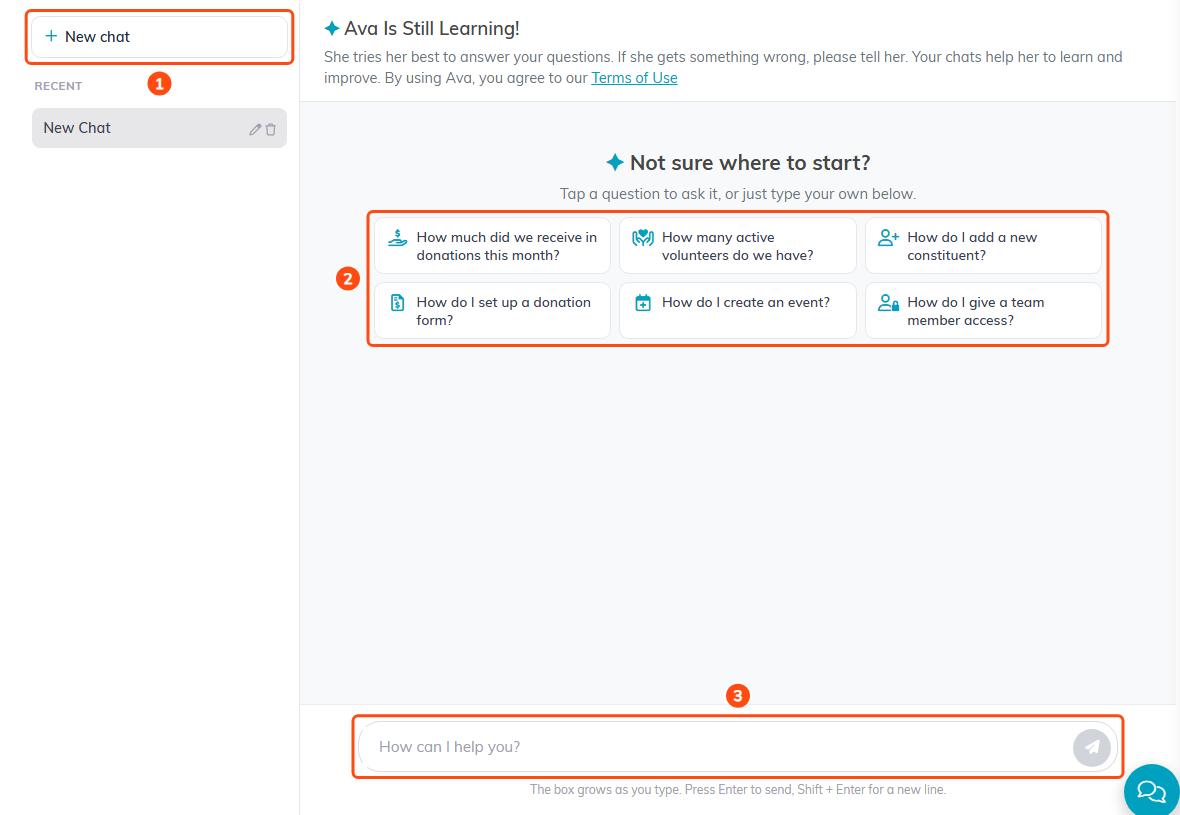
1. New chat. 2. Suggested questions: tap one to ask it. 3. Type your own question here.
Tips for effective questions:
- Be specific about what you're trying to accomplish
- Include relevant context (which feature, what you've already tried)
- Ask one question at a time for clearer responses
- If Ava's first response doesn't fully help, ask follow-up questions
Each chat you ask something in is saved to your history as its own conversation, titled from your first question. A chat you never typed in is cleared the next time you open the page.