Knowledge Base Article
How to Prevent Email from Being Sent to a Constituent
To stop Argenta from emailing someone, turn on Do Not Email on their constituent record. The setting lives on the constituent, so it covers that person no matter which roles they hold (donor, volunteer, member, participant).
Turn On Do Not Email
- Open the person's constituent record (find them under Constituents, or click their name from a donor, volunteer, or member record).
- Go to the Contact Info tab.
- At the top of the page you will see a row of switches. Turn Do Not Email ON.
- Click Save & Continue (or Save & Exit) at the bottom of the page.
The switch does not save on its own, so the save step matters. Moving to another section of the record from the workspace menu saves it for you, but if you click Exit Record or leave the page any other way without saving, the change is lost.
Argenta can also turn it on by itself. When an email to the person hard-bounces (the address does not exist) or they mark one as spam, Do Not Email is switched on for every record holding that address, and the change is logged. The same happens when a person is added, or their email is changed, to an address that has already hard-bounced: Do Not Email starts switched on, and the activity log says why. A hard bounce counts even when the email came from another organization that uses Argenta. So if you find it on and nobody on your team set it, that is the likely reason.

Do Not Email, at the top of the Contact Info tab.
The Other Switches On That Row
- Do Not Email: stops email to this person.
- Do Not Call: flags them as not wanting phone calls.
- Do Not Text: stops text messages.
- Do Not Solicit: flags them as not wanting fundraising appeals. This is the marketing consent flag, and it is what an unsubscribe link turns off.
- White Listed: a note that the constituent has added your email address to their safe senders. It does not override a Do Not switch or change who receives a send.

The rest of the row, with Do Not Solicit marked.
What Do Not Email Stops
Once it is on, the person is left out of the email your team sends:
- Mail Room email and email batches. When Argenta builds the recipient list for a send, people flagged Do Not Email are not pulled in, so they are not counted, batched, or queued.
- Reminders and other constituent-facing email triggered from records and workflows.
What Still Goes Out
Receipts and confirmations for something the person gave, paid for, or signed still send, even when Do Not Email is on. These are transactional documents rather than marketing, and the person needs them. That covers:
- Donation receipts from the donation form, fiscal donations, recurring gifts, in-kind donations and material donations.
- Payment receipts for card payments, including event tickets, memberships, campaign sales, sponsorships and mission trip payments.
- A signed waiver: the signer's own copy of the waiver they just signed.
- A peer fundraiser's sign-up confirmation, which carries the links to their fundraising page.
Everything else respects the flag, including reminders and any other email sent from a record or workflow.
Where You Will See It
- Constituent card: a small pink Do Not Email badge shows next to the person's name and roles, on every page that displays their card. Do Not Solicit and Do Not Call show the same way.
- Contact Info tab: the switch stays ON.
- Email lists: the person is excluded when the send list is built.

The badge shows on the card wherever the person appears.
Do Not Email Or Do Not Solicit?
They are different, and picking the right one matters.
- Do Not Email is the broad one. Use it when someone says stop emailing me.
- Do Not Solicit withdraws marketing consent only. Use it when someone wants to stay in touch but does not want fundraising appeals. This is what the unsubscribe link in your email turns off, which is why an unsubscribed donor still gets their receipts and confirmations.
See Everyone Who Has Opted Out
Four reports in the Report Center cover this:
- Constituent Do Not Email Report at /reports/do-not-email
- Constituent Do Not Solicit Report at /reports/do-not-solicit
- Constituent Do Not Mail Report at /reports/do-not-mail
- Unsubscribe Report at /reports/email-unsubscribes
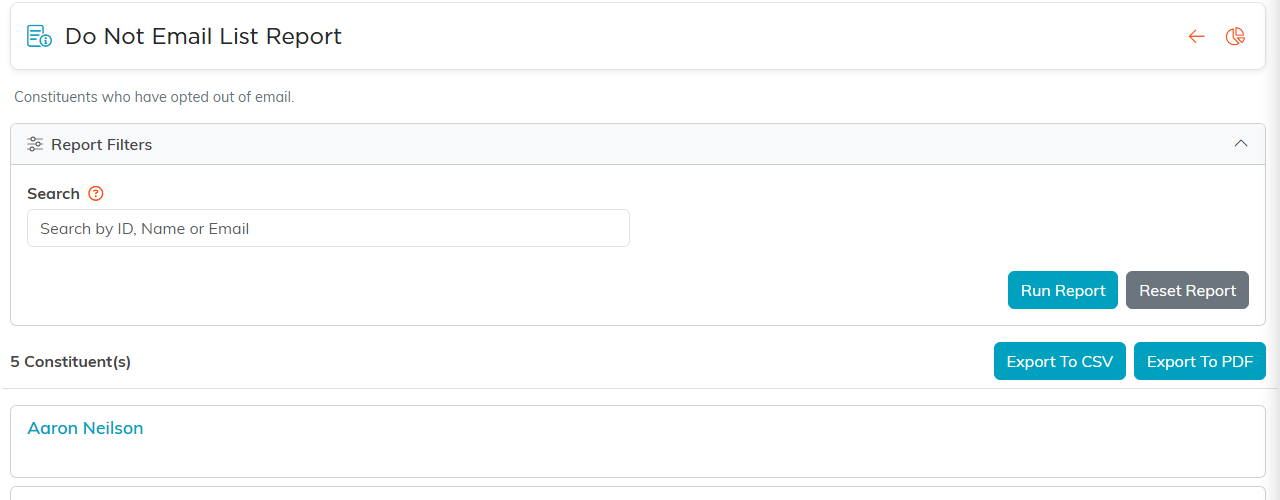
The Constituent Do Not Email Report, with CSV and PDF export.
Worth Knowing
- The flag lives on the constituent record, not on the donor, volunteer, or member record. Change it in one place and it applies everywhere.
- It only governs email Argenta sends. Mail you send from your own inbox is not affected.
- When someone asks to be taken off your email, set it right away. Honoring opt-outs protects your sender reputation, and it is what the person asked you for.
