Knowledge Base Article
How to Add a Product to the Catalog
Every item you stock, sell, or lend starts as a product record. Add it to the catalog first, then inventory and orders have something to point at.
Add the product
- Go to Products & Inventory > Products and click Add New. A short form opens asking for the Product Name. Enter it and click Add & Enter Details, and Argenta creates the record and opens the Product Workspace on Product Details. Cancel & Exit leaves nothing behind.
- Fill in the required fields, marked with an orange asterisk: Product Name and Unit of Measure. Then enter the Vendor Cost (what you pay for it); an empty one reads and saves as 0.
- Pick the Vendor you buy it from. Markup works itself out from your cost and price.
- Write a Product Description.
- Set Your Retail Price, which is what you charge. This field only becomes editable once you turn on the Product Is for Resale switch.
- Click Save All Changes & Continue to stay on the record, or Save All Changes & Exit to go back to the list.

Add New asks for the product name, then creates the record and opens the Product Workspace.

Markup works itself out. You cannot type into it.

Your Retail Price only unlocks once Product Is for Resale is on.
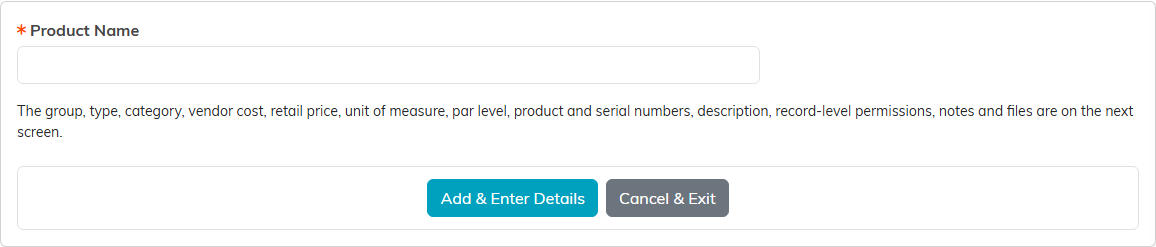
Only the product name lives here. Nothing is saved until Add & Enter Details.
The four switches
These decide how the product behaves everywhere else, so they are worth a moment:
- Active Product keeps it in circulation.
- Product Is for Resale unlocks the retail price. Leave it off for something you buy purely for internal use.
- Product Can Be Lent Out makes it available to the Lend Out Inventory pages.
- Track In Inventory brings it into the inventory count. Without this you have a catalog entry and no stock tracking.

These four decide how the product behaves everywhere else.
Classifying and identifying it
- Product Type, Product Category, and Product Group are how you organize the catalog for filtering and reporting.
- Vendor's Product Number and Serial Number tie your record back to the supplier's.
- Par Level is the stock level you want to keep on hand, which is your cue to reorder.
- Unit of Measure is required, and it is how the product gets counted everywhere else in the system.

Three ways to organize the catalog, all your own lists.

These tie your record back to the supplier's.
Changing many products at once
To change several products together, tick them on the Products list, open - Choose Bulk Action -, pick an action and click Run Bulk Action.
- Mark Selected Records as Active or Inactive, For Resale or Not for Resale, and For Lending or Not for Lending set the same switches you find on each product.
- Not for Resale also sets each product's retail price to $0.00, just as turning off Product Is for Resale on one product does.
- Products that already have the setting, and products you are not allowed to edit, are left as they are, and the message tells you how many. The one exception is a product already marked Not for Resale that still shows a price: Not for Resale sets that price to $0.00 too.
- Change Classification Code for Selected Records and Add A Note for Selected Records open a window where you choose the code or write the note.
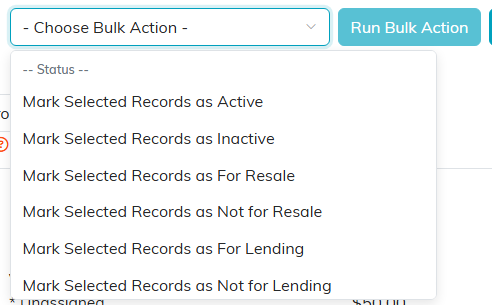
The Status actions set Active, For Resale and For Lending on every product you ticked.
Worth knowing
- There is no image upload on a product record. Describe the item in the description instead.
- Quantity on hand is not set here. Stock lives in Product Inventory and is added or removed there.
- Copy & Add New on the product itself, and the orange copy action on the product list, save a lot of typing when you are adding variations of the same item.
- The workspace also holds Product Files, Product Notes, and Record Permissions, where you can set the record view only or lock it.

Copy & Add New saves a lot of typing on variations of the same item.

Files, notes and record permissions are on this bar.
