Knowledge Base Article
What is a Grantor in Argenta?
A grantor is whoever funds you: a foundation, a government agency, a corporate giving program. In Argenta a grantor is a constituent you have designated as a grantor, the same way someone becomes a donor or a volunteer.
That matters, because it means a grantor is not a separate contact list. If a foundation already exists in your database, you designate that record rather than creating a duplicate.
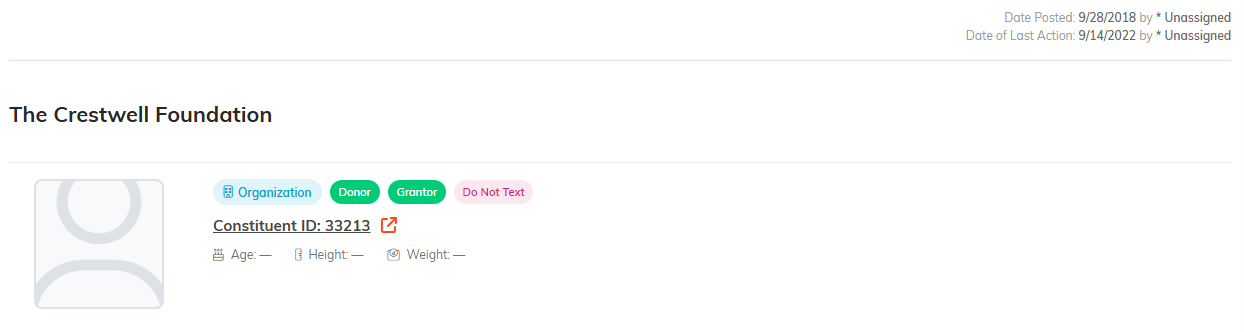
The green Grantor badge is the designation. The record underneath is a constituent.
Typical Grantors
- Private foundations
- Community foundations
- Corporate giving programs
- Government agencies, federal, state, and local
- United Way and other federated funders
Add A Grantor
- Go to Grant Management > Grantors.
- Click Add New. The Add A New Grantor page opens with a Designate A Constituent As A Grantor panel.
- Start typing the constituent's name and pick them. If they are not in your database yet, use the add icon to create the constituent right there.
- Click Add Grantor & Enter Details. Argenta creates the grantor and opens Grantor Details, where you fill in the rest and save.
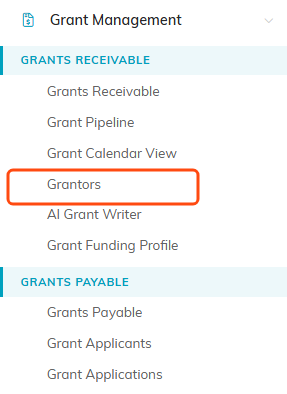
Grantors sits under Grants Receivable.

Add New is the first button under the filter bar.
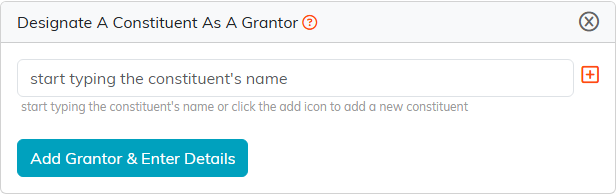
The add icon at the right creates the constituent without leaving this page.
What The Grantor Record Holds
- Grantor Type: foundation, government, corporate, and so on. This is what makes your funder list sortable and reportable.
- Acquisition Source: how the relationship started.
- Associated Campaign: ties the funder to a campaign for reporting.
- Chapter, Division, Department, District, and Precinct: where the relationship sits in your organization.
Name, address, and contact details come from the underlying constituent record, so you update them in one place and they stay right everywhere.
Save with Save All Changes, or Save All & Exit Record when you are finished.

What the grantor record itself holds. Everything else comes from the constituent.

Save and stay, or save and go back to the list.
Picking The Grantor On A Grant
On a grant receivable record, the Grantor box searches all of your constituents, so a funder you already have on file comes up even if they are not marked as a grantor yet. The orange plus beside the box adds a funder who is not in Argenta without leaving the grant. Grantor is not required, so you can log a grant you are chasing before the funder is settled and fill it in later.
