Knowledge Base Article
What is a Project in Argenta?
A project in Argenta is a body of work you plan, break into tasks, assign to people, and track to completion. Projects suit internal initiatives, client deliverables, and grant funded work, and they can be billed to a client when the work is billable.
What a project holds
Every project opens into a workspace, and each page of it tracks one part of the work:
- Project Details: the title, status, priority, manager, dates, budget, and client.
- Project Tasks: the task list that drives the project's progress.
- Project Team: the people working on it.
- Project Checklists and Specifications: what has to be done and to what standard.
- Time Tracking and Client/Customer Billing: hours logged, and the invoice you generate from them.
- Sprint Planning, Project Discussions, Meeting Minutes, Project Files, and Project Notes for the planning and the paper trail.

Every page named above is a tab in the Project Workspace.
How progress is measured
The Project Progress meter on Project Details is calculated for you. It is the share of the project's tasks that are marked complete, shown as a percentage with the count underneath, for example "4 of 10 tasks complete". A project with no tasks yet reads "No tasks yet". You cannot type a percentage in, and you do not need to. Completing tasks moves the meter.

The progress meter on Project Details. The count sits on the right.
Grouping your projects
Project Group, Project Type, and Project Category are three separate lists your organization sets up and edits, so the options are whatever your team has defined. Use them to sort work the way your organization thinks about it, then filter the project list by any of them.

The three grouping lists on Project Details. The orange plus (admins and master builders only) adds an option to a list.
Projects and tasks
A project is a container with its own task list, its own team, and its own billing. A task is a single action item that stands on its own.
You can move a task up into a project when it grows past a single action. Open the task and use Convert Task To A Project to turn it into a full project, or Convert Task To A Project Task to move it into an existing project as one of that project's tasks. The conversion runs in that direction only, so a project cannot be turned back into a standalone task.
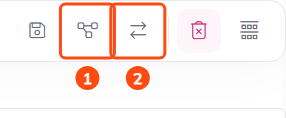
Both conversions start in the task's title bar. 1 turns the task into a project, 2 moves it into a project you already have.
