Knowledge Base Article
How to Track Auction Financials
Track how your auction is doing financially on the Budget & Financials tab.
Open Budget & Financials
- Open the auction.
- Click Budget & Financials in the workspace navigation.

Budget and Financials is one of the tabs in the auction workspace menu.
What the Financial Summary shows
The summary has two columns.
- Auction Income: Projected Income, Invoices and Sponsorships. In-kind (non-cash) sponsorships appear underneath in gray, marked not in totals, and are shown for reference only.
- Auction Expenses: Projected Expenses, your Target Budget, and Actual Expenses.
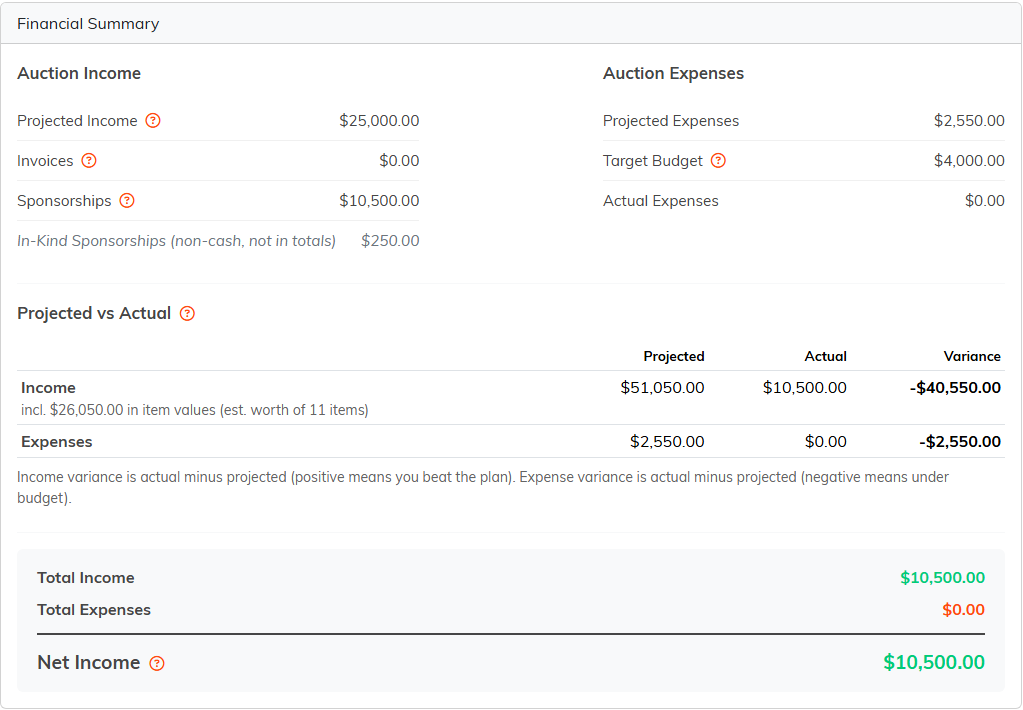
The Financial Summary adds up income, expenses and your net result.
Where the money from your auction shows up
The Invoices line is the one to know. When your auction closes, each winning bidder gets one invoice covering everything they won, so your winning bids arrive here as invoices rather than as a separate list of sales. Auctions have no ticket sales or donation lines of their own.
That figure is what you billed, not what you have collected. It counts each invoice at its full total whether or not a penny has been paid on it, so check the Invoices list to see what has actually come in. The exception is an invoice closed with nothing kept: Unpaid/Closed, or Refunded/Closed once its refunds cancel out its payments. It stays on the list with a gray CLOSED UNPAID or REFUNDED badge, and is left out of the total.
Projected vs Actual
Below the summary, a small table lines up Projected, Actual and Variance for income and for expenses.
Its projected income figure is usually larger than the one in the summary above, and that is on purpose: this table adds the estimated worth of your auction items on top of the income lines you typed. It says so underneath the number.
Income variance is actual minus projected, so a positive number means you beat the plan. Expense variance is also actual minus projected, so a negative number means you came in under budget.
Your totals
- Total Income: invoices plus cash sponsorships.
- Total Expenses: your recorded actual expenses.
- Net Income: total income minus total expenses. Only real money counts here, so projections and in-kind sponsorships never touch it.
The four cards, and which ones you type into
Four cards sit above the summary, and they do not all work the same way.
- Projected Income and Projected Expenses are yours to plan with. Both use Add New to start a line and Save All to save what you have added.
- Actual Expenses lists the expenses recorded against this auction. Add Expense opens the regular expense screen with the auction already attached.
- Actual Income is a read-only view. It shows your associated invoices in one section and your sponsorships in the other, with a total across the top and an export button on each. There is nothing to type in, because Argenta builds this from the invoices and sponsorships you already have.

The two projected cards take new lines. The two actual cards report what is already there.
Sponsorships
Sponsorships are recorded on their own Sponsorships tab and roll into the summary from there. Cash sponsorships count toward your income. In-kind ones are listed for reference and stay out of the totals.
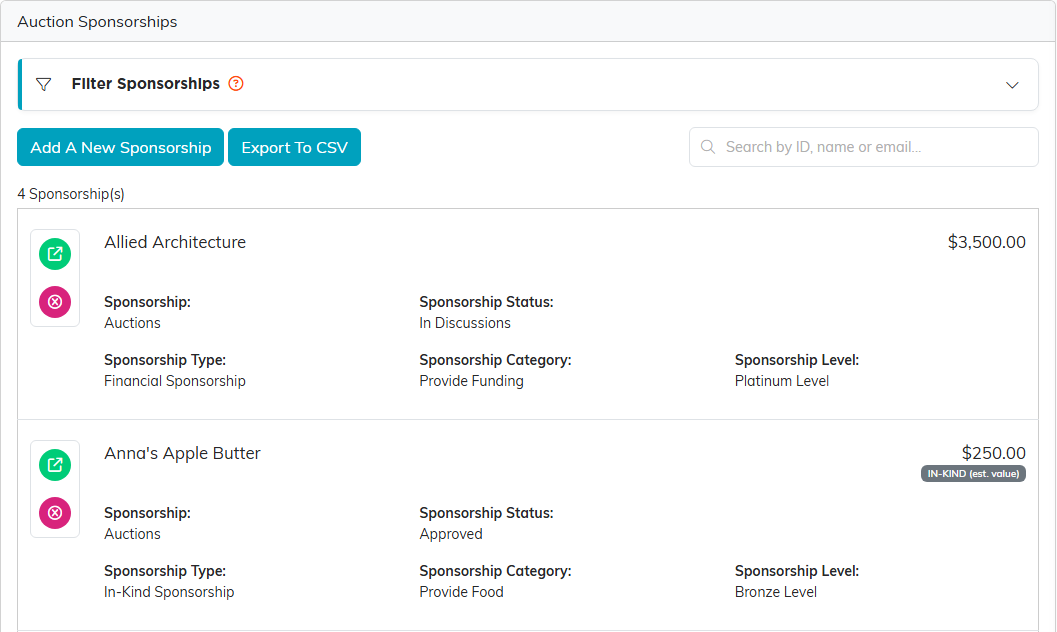
Sponsorships are entered on their own tab and roll into the summary.
Setting your goals
On the Auction Details tab, set the Target Budget and Fundraising Goal. Then add your projected numbers, let the actuals fill in as invoices and sponsorships come through, and check the summary for your net result.

Goal and budget live on the Auction Details tab.
Three auction reports in the Report Center
The Financial Summary is the auction's own page. For the detail behind it, the Report Center carries three auction reports under Fundraising Reports, and Budget & Financials links straight to all three. Each one exports to CSV and to PDF.
- Auction Results lists every item with its type, its channel, how many bids it drew, the winning bidder and its status.
- Auction Bidder Statements gives one line per winning bidder — items won, total owed, invoice, settlement, whether a card is on file, the method, what was collected and the date paid — and expands to show the items. It also prints a letterhead statement for a single bidder listing each line with the amount paid, the good faith estimate of fair market value and the tax-deductible portion, which is what a bidder needs for their own records.
- Auction Profit and Loss sets projected against actual for both income and expenses, and can compare this auction against another one. Its Collected column counts the payments recorded on invoices and on cash sponsorships, so a sponsorship that has been promised but not yet paid counts toward Gross Revenue and not toward Collected.
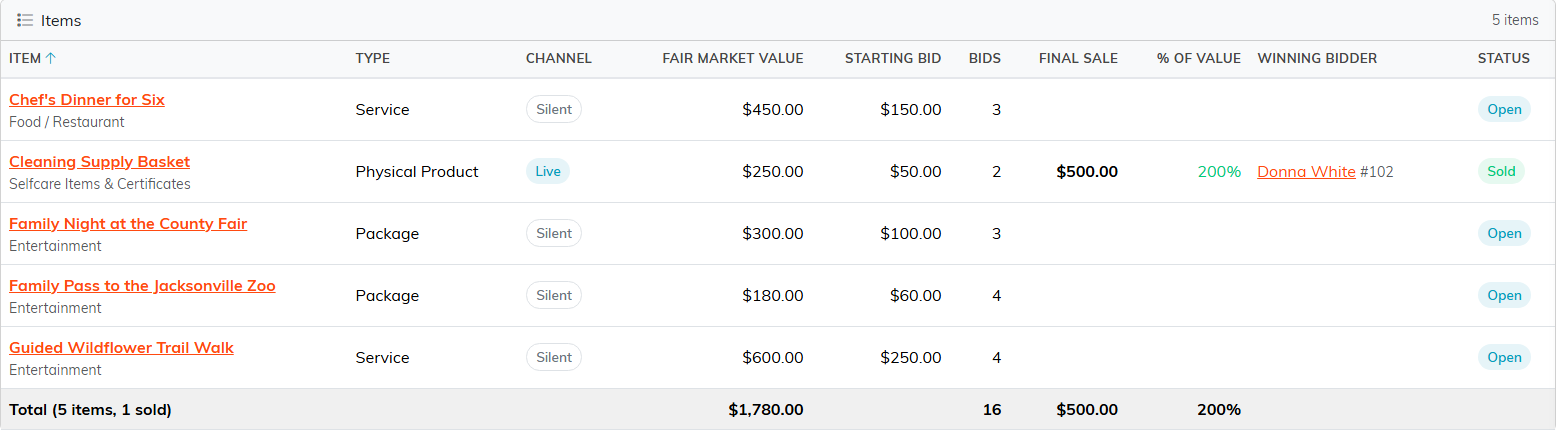
Auction Results: one row per item, with the bids it drew, who won it and whether it sold. Click a winning bidder's name to open their constituent record.

Auction Bidder Statements: one line per winning bidder. Click a row to open the items they won, or click the bidder's name to open their constituent record.
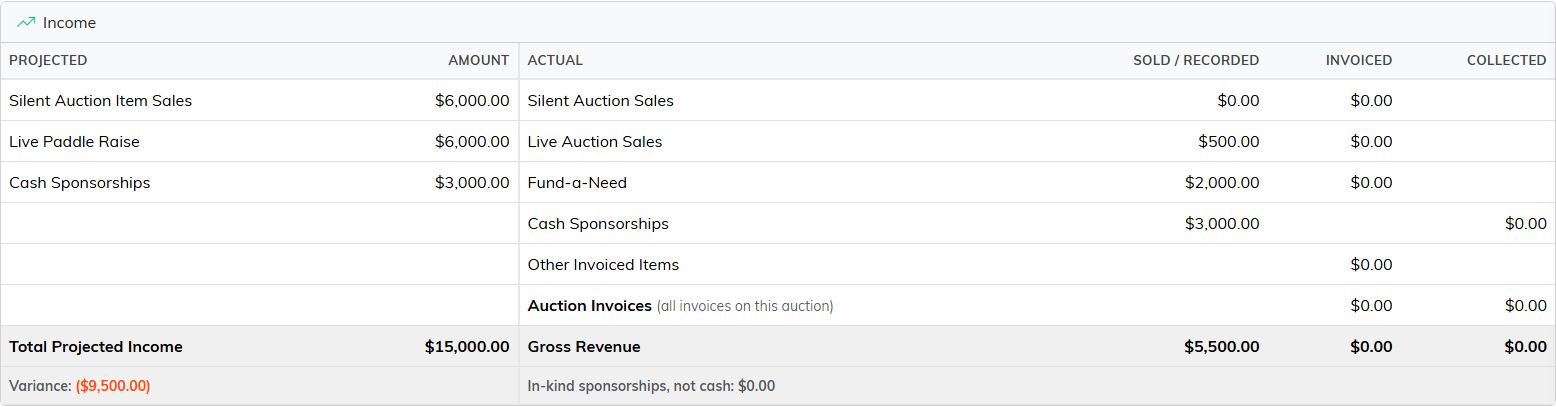
Auction Profit and Loss sets projected income beside actual. Here the plan is entered, a live lot has sold, Fund-a-Need gifts are recorded and the cash sponsorships are pledged, while nothing has been invoiced or paid yet, so Collected is $0.00.
Taking it away with you
Print to PDF at the top of the page gives you the summary as a document, which is the quick way to hand your numbers to a board or a committee.
