Knowledge Base Article
What is an Auction in Argenta?
An auction in Argenta is a fundraising tool for running online silent auctions, charity auctions, and bidding events to raise money.
Key features
- Online bidding: supporters register and place bids on a public auction form, with a card kept on file.
- Item management: add items with photos, descriptions, values, and starting bids, and choose which ones show on the public form.
- Bid tracking: watch every bid and see the winning bidder on each item.
- Financial tracking: track projected and actual income, expenses, and sponsorships.
- Campaign and event links: connect an auction to a fundraising campaign and an event for consolidated reporting.

Each feature above has its own tab in the Auction Workspace.
Each tab of the Auction Workspace has a short Show Me How To Use This Page video at the top right; click it to watch, and use its chapters to jump to the part you need.
Auction statuses
- New: created but not yet set up.
- Pending Approval: awaiting approval to proceed.
- In Planning: setting up items and details.
- Bidding Open: live and accepting bids.
- Bidding Closed: the bidding period has ended.
- Complete: finished and settled. Argenta sets it for you once the winners are awarded and billed. While any silent item still has a bid that has not been awarded, or a winner who has not been charged or sent their invoice, you cannot choose it yourself; choose Bidding Closed to stop bidding instead.
- On Hold: paused for now. An auction On Hold, or Canceled, is not closed at its end time, so nobody is charged or invoiced.
- Canceled: called off.
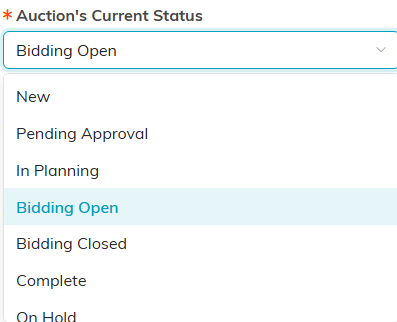
Status is set on the Auction Details tab. The list scrolls for the rest.
Common uses
- Annual gala silent auctions
- Online-only charity auctions
- Event-based fundraising auctions
- Item-donation auctions
