Knowledge Base Article
How to Manage Program Volunteers
Volunteers are linked to a program through the program's Connections tab. There is no separate Volunteers tab on a program record.
Linking Volunteers to a Program
- Open the program from Programs > Program List
- Choose the Connections tab
- Find the Associated Volunteers panel
- Add the volunteers who work on this program
The Three Volunteer Connections
- Associated Volunteers: the individual people
- Associated Volunteer Tasks: specific pieces of volunteer work tied to this program
- Associated Volunteer Task Groups: groups of tasks, useful when a program runs the same set of jobs repeatedly
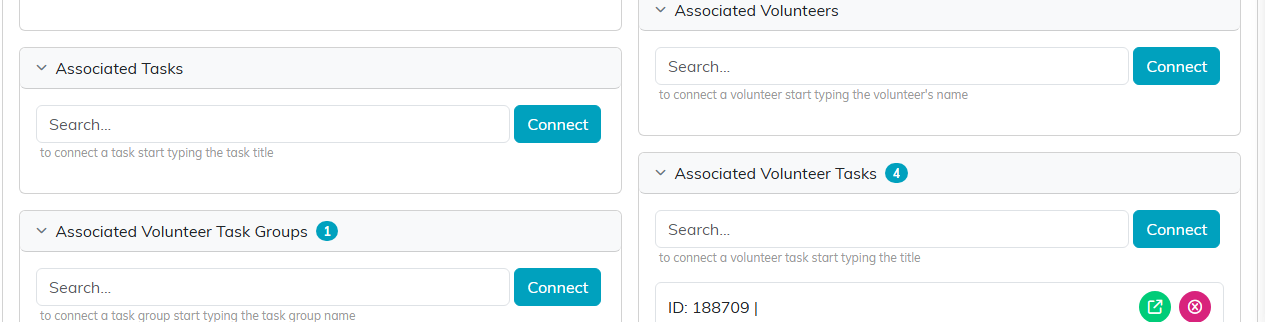
All three sit on the Connections tab, each with its own search and Connect button.
Connecting a volunteer to a program does not change their volunteer record. It records that they are part of this program, and the link can be removed again from the same panel. If the program is view-only for you, the search box and the pink X are not shown, so you can see the connections but not change them. If it is locked to you, the page shows only a message saying the record is locked.
Where Volunteer Hours Are Recorded
Hours belong to the volunteer task, not to the program and not to the volunteer record. Each task carries the number of hours for that piece of work, and a volunteer's service hours are the total of the tasks they did. So the way to make a program's volunteer effort countable is to record the work as volunteer tasks and connect those tasks to the program.
Managing the Volunteers Themselves
Volunteer records, groups, positions, training and needs are managed under Volunteerism, not on the program. From there you can reach:
- Volunteers and Volunteer Groups
- Volunteer Positions and Volunteer Needs
- Volunteer Training
- Volunteer Tasks, Volunteer Task Groups and the Volunteer Task Calendar View
Volunteer Reporting
Volunteer reporting is in the Report Center rather than on the program record. The volunteer reports cover areas including hours, years of service, milestones, skills, training, mileage, task details, unassigned tasks and group rosters. The hours reports can be filtered to a range of total service hours, which is how you find your most active volunteers.
Best Practices
- Link volunteers to the program so the connection is visible from both sides
- Record the work as volunteer tasks, or the hours cannot be counted anywhere
- Keep training and availability on the volunteer record, where every program can see it
