Knowledge Base Article
How to Set Up Auction Signup Forms
An auction has its own public pages where bidders register and bid. The form is designed from the auction record.
Opening the Designer
- Go to Fundraising > Auctions
- Open the auction
- Go to its form design page, headed Public Form Design
Auctions sit under Fundraising, not under Event Management.

The Sections of the Designer
Below the sharing card sit two sections. Click either header to fold it away while you work on the other.
Banner Image
The picture across the top of the public auction pages. Upload adds one from your device, and the folders beside it hold what you have already uploaded. Refresh, Rename Folder, Rename File and Delete tidy that library up.
Uploading a picture does not make it your banner. Select the one you want, then click Save As Banner Image underneath the preview. That is the step that applies it, and it takes effect straight away rather than waiting for Save All Changes.
Once a banner is set, it shows under Current Banner with a Remove Banner Image button beneath it, which takes the picture off the public pages.

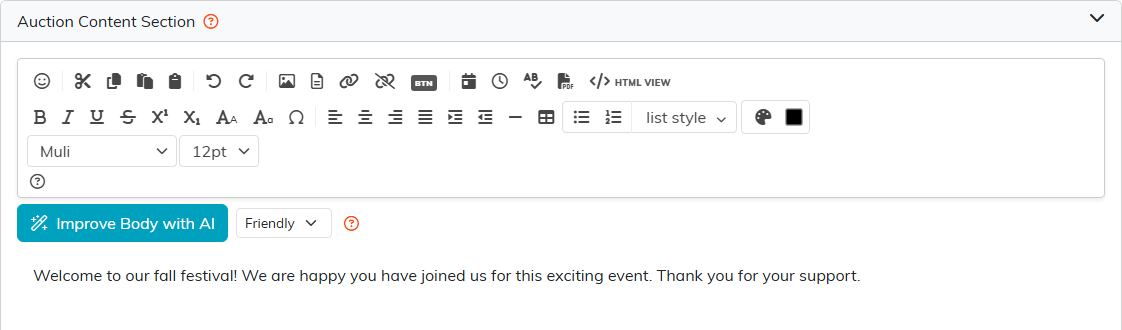
Auction Content Section
The wording bidders read. Improve Body with AI rewrites what you have typed, and the list beside it sets the tone.
Unlike the banner, this wording is held until you save it, so use Save All Changes before you leave.
The Public Auction Pages
Your auction's public address gives bidders four pages: the auction's own front page, a registration page, the item list, and a page per item where they place their bids.
Sharing the Auction
The Share The Public Auction Form card holds the auction's Public Link with a Copy button, and a QR code you can save with Download PNG or Download SVG. The QR code is what to put on table cards, programs and signage at the event itself.
Saving and Leaving
Click Save All Changes to keep your work. It sits both at the top of the page and at the foot, so you do not have to scroll back. Exit Workspace leaves without saving and without asking, taking you back where you came from.

Best Practices
- Open registration before the night, so bidders are not signing up while they are trying to bid
- Put the QR code on every table, since a bidder who cannot find the link does not bid
- Save your wording before you leave. Exit Workspace does not save for you and gives you no warning
- Check the item list on a phone before the doors open
