Knowledge Base Article
How to Create Volunteer Application Forms
Argenta collects volunteers through public sign-up forms. The one you design yourself is the sign-up form attached to a volunteer task group.
The Volunteer Task Group Sign-Up Form
- Go to Volunteerism > Volunteer Task Groups
- Open the task group
- Go to its form design page, headed Public Sign-Up Form Design
The page holds three cards. Share The Public Sign-Up Form gives you the Public Link with a Copy button and a QR code you can save as a PNG or an SVG. Below it are two cards you can fold away by clicking their headers.
Banner Image for Public Task Calendar
This sets the picture that runs across the top of the group's public page. Upload adds a new image, and the folder list beside it holds what you have already uploaded. Rename Folder, Rename File and Delete tidy that library up.

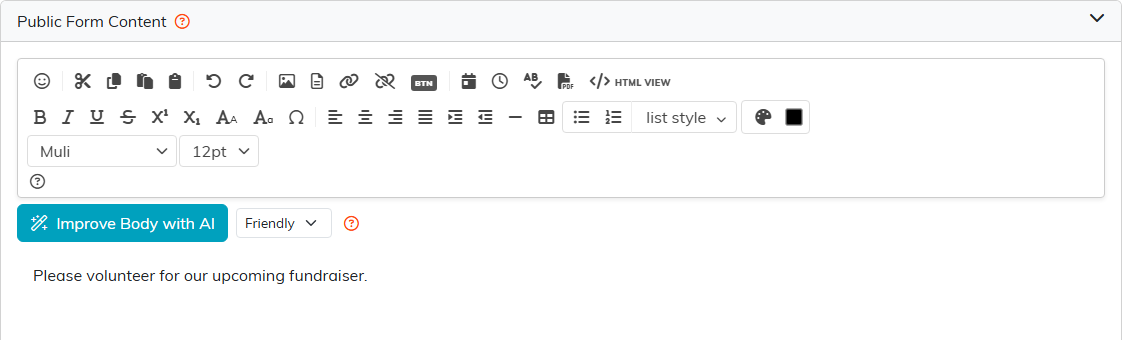
Public Form Content
This is the wording volunteers read at the top of the group's sign-up page, above the list of shifts. Use it for what the day involves, what to bring and who it suits. Improve Body with AI rewrites what you have typed, and the list beside it sets the tone.
Two things worth knowing before you edit it. This is the same text as the task group's own description, so changing it here changes it everywhere else the group is described. It also goes out in the confirmation and reminder emails for every shift in the group, added to each shift's own task description.
Saving and Leaving
Click Save All Changes to keep your work. Exit Workspace leaves without saving.

The Other Volunteer Entry Points
Depending on how your organization is set up, volunteers may also reach you through a Volunteer Interest Form, for people who want to help but have not picked a job yet, or a Volunteer Task Sign-Up Form, where they choose a specific task.
Both appear under Our Public Interfaces when your organization uses them, and both open in a new tab.
What Happens After Someone Signs Up
Sign-ups arrive as volunteer records you can work with under Volunteerism, where volunteer groups, positions, training and needs are managed.
Best Practices
- Say plainly on the form what the job involves and how long it takes
- Use the task group form when you need people for specific jobs, and the interest form when you are building a pool
- Remember that the content you write here is also what lands in the confirmation email, so write it for both
- Follow up quickly. A volunteer who hears nothing for two weeks has usually moved on
