Knowledge Base Article
How to Track Constituent Web and Social Media
A constituent's websites and social media accounts live on the Communication page of the Constituent Workspace. There is no Web & Social tab.
Websites
The first card on that page holds Website 1 and Website 2, both free text up to 500 characters. The same two fields also appear on the constituent's Contact Info page, labeled Primary Website and Secondary Website, and either place writes the same value.

Social media accounts
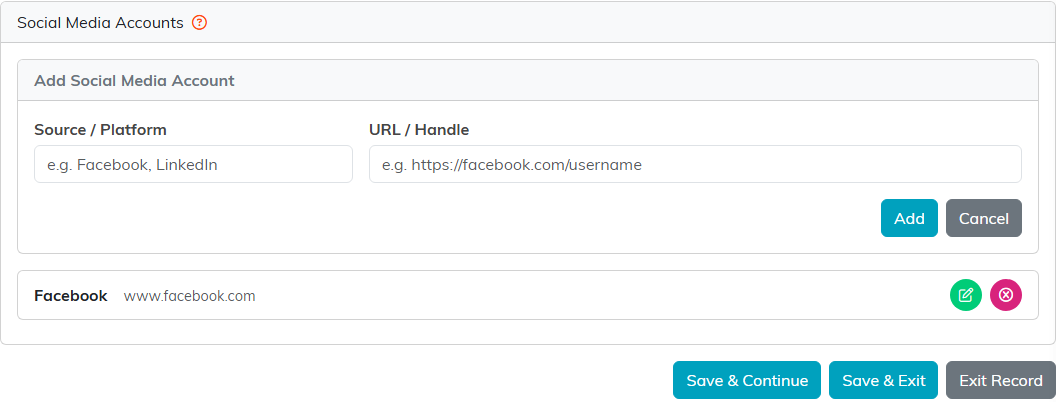
The third card is Social Media Accounts. There is no fixed field per platform, no LinkedIn box and no Twitter box. You add as many entries as you like, and each one has two boxes:
- Source / Platform. What it is, typed by you. Facebook, LinkedIn, anything at all. It is required: Add and Save refuse an entry without one.
- URL / Handle. Either the full address or just the handle.
- Click Add New.
- Fill in Source / Platform and URL / Handle.
- Click Add.
Each saved entry then carries a green pencil to edit it and a pink icon to delete it. Both boxes are plain text with no format checking, so a mistyped handle is stored exactly as you typed it and nothing warns you.
The save button that catches people out
Social media entries save on their own Add or Save button inside the card, the moment you click it, so an account you add sticks even if you leave the page without saving. Websites and the communication topics above it work the other way round: those still need the page's own save: Save & Continue or Save & Exit at the bottom, or the save icon at the top.
What Argenta does with this, and what it does not
It is a record you keep, not something the software acts on.
- Saved addresses are not clickable. The entry shows the source in bold with the address beside it as plain text, so copy it out to open the profile. That is because the box takes a bare handle just as happily as a full address.
- Nothing filters, exports or reports on it. Social media accounts are not on the constituent list filters, not in the constituent CSV export, and not in any report. Website 1 and Website 2 are not in the constituent export or filter either.
- It does survive a merge. Merging duplicate constituents carries the social media entries onto the surviving record.
- Deleting the constituent deletes them along with the rest of the record.
So if you want to work from this information, plan on opening the record to read it. Argenta will not group, score or count people by it.
