Knowledge Base Article
How to Manage Expense Reimbursements
Reimbursing somebody in Argenta is a normal expense record with the reimbursement switches turned on. You record the expense, attach the receipt, and mark it reimbursed once you have paid the person.
Recording the expense
- Go to General Financials > Expenses and click Add A New Expense.
- Fill in the expense as you would any other. Purchase Date, Total Cost and Payee (Who Did You Pay for This) are required; add the Expense Category, Payment Method, Check/PO/Ref. # and an Expense Description as they apply.
- If you use them, set Chapter, Division and Department. Political organizations also get District and Precinct.
The receipt goes on the expense itself
The expense record holds one receipt file directly on it, under Upload The Receipt for This Expense, and once attached it can be downloaded from the record. Only images and PDFs are accepted, so a spreadsheet or a Word file is refused.
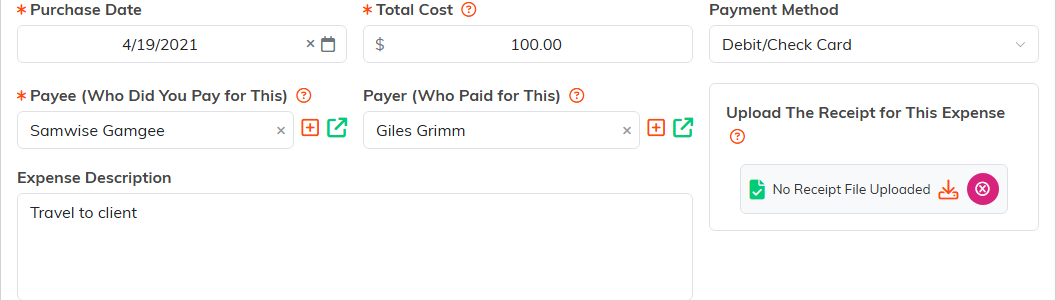
Anything else belonging to the expense goes on its Expense Files page, and the record also carries Connections, Refunds, Expense Notes and Record Permissions pages.
Marking it for reimbursement
At the foot of the expense there is a reimbursement section with two switches and a date:
- Reimbursement Needed says somebody is owed this money.
- Reimbursed says you have paid them. It stays unavailable until Reimbursement Needed is on, so the two cannot contradict each other.
- Date of Reimbursement records when you paid, and only opens once Reimbursement Needed is on.

There is no approval workflow, and that is worth knowing
Argenta does not route a reimbursement to an approver. Staff can send a request from Staff & HR > Reimbursement Request, which creates the expense with Reimbursement Needed already on and, if your team has an email address for financial notifications, emails it. Nothing after that is routed. The Expense Approved switch is a record you set, not a step, and there is no reject, no request for more information, and no queue of approved expenses waiting to be paid. The switches record what you decided, they do not ask anybody.
So your own approval process lives outside Argenta, and what you keep here is the record of it: the receipt on the expense, your reasoning in the notes, and the two switches showing where the money got to. To find what is still owed, the expense list filters on Needs Reimbursed and Is Reimbursed separately, so Needs Reimbursed Yes with Is Reimbursed No is your outstanding list. There is a Reimbursement Date Range filter too, for pulling a period you have already paid.
Worth doing
- Attach the receipt when you create the expense, not later. It is the part that goes missing.
- Put the reason in the notes while you still remember it, since the description field is short.
- Set the date when you tick Reimbursed, so the record says when the person actually got paid.
