Knowledge Base Article
How to Track Employment History
The Employment tab on a constituent keeps their work history: where they have worked, what they did, and when. A person can carry as many entries as you need, so past and present jobs sit together in one place.
To add one: open the constituent record, go to the Employment tab, and click Add New. Fill in the Add Employment Record window and click Add.
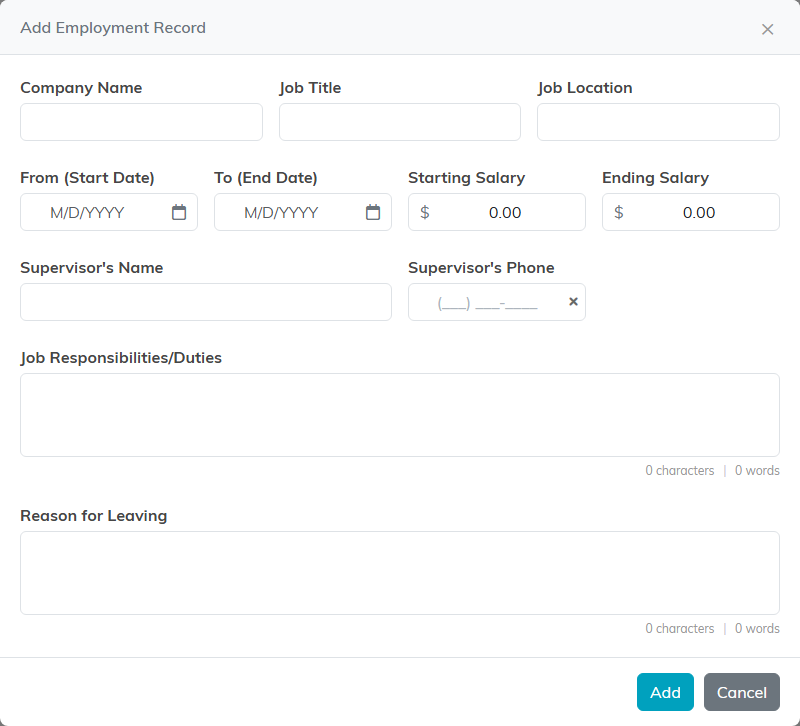
Each entry takes:
- Company Name and Job Title (an entry needs at least one of the two)
- Job Location
- From (Start Date) and To (End Date)
- Starting Salary and Ending Salary
- Supervisor's Name and Supervisor's Phone
- Job Responsibilities/Duties
- Reason for Leaving
Beyond a Company Name or a Job Title, nothing is required, so record only what you actually hold. An end date cannot be before the start date; for a current job, fill in the start date and leave To (End Date) blank, and the entry shows Present. The salary, supervisor and reason-for-leaving fields make this useful for staff and applicant history as well as for knowing where a constituent works.
Keeping company names spelled the same way across constituents is worth the small effort, because it is what lets you find everybody at one employer later.
