Knowledge Base Article
How to Handle Email Bounces and Complaints
Argenta records what happened to every email in a send, so you can see which addresses failed and which recipients reported the message as spam.
Bounces and complaints
A bounce is an email that could not be delivered. Some are permanent, like an address that does not exist. Others are temporary, like a full mailbox or a server that is briefly unavailable.
A complaint is a recipient pressing "Mark as Spam" in their own email program, which their provider reports back to us. Both matter for the same reason: mail providers judge your future sends on how your last ones went.
Seeing what happened to a send
- Open the email batch and click the Emails tab.
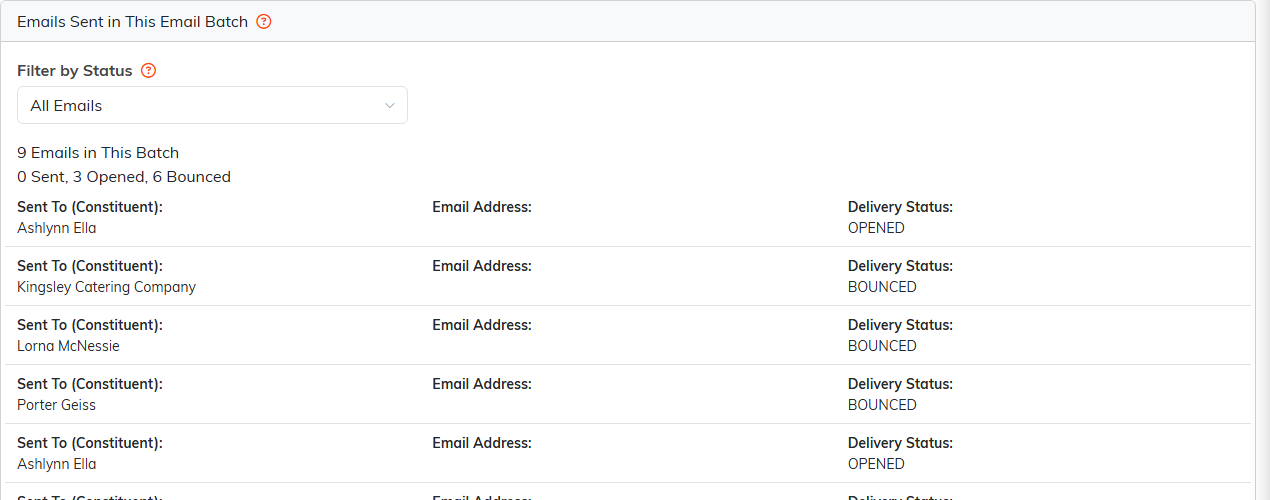
- The counts across the top read Sent, Opened and Bounced.
- Every row carries its own Delivery Status, and Filter by Status narrows the list to the bounced ones.
The Complaints tab on the same batch lists the emails reported as spam.
What Argenta does on its own
- An address that bounces permanently, or that a recipient reports as spam, stops being sent to. Every constituent in your account that holds that address, as their primary or secondary email, is also marked Do Not Email, not just the one the email went to. A temporary bounce changes nothing.
- A marketing send that starts hard bouncing heavily, or that too many recipients mark as spam, is stopped instead of being left to run to the end. The emails it has not sent yet are held rather than lost, so the send can be released once the list is sorted out.
Cleaning up afterwards
- Filter the batch's Emails tab down to the bounced addresses.
- Correct or clear the address on each constituent record.
- Reach those people another way, by phone or post, and ask for a current address.
On Manage Mailing Lists in the Mail Room, a list holding dead addresses shows how many are cleaned: addresses that hard bounced, were reported as spam, or are suppressed. Sends drop them, so correct or clear them on the constituent records.
Keeping bounces and complaints low
- Check an address when you first collect it, rather than finding out after a send.
- Keep the unsubscribe link easy to find. Someone who cannot find it presses the spam button instead.
- Send to people who asked to hear from you, and send something worth opening.
- Clear out addresses that have failed more than once instead of sending to them again.
