Knowledge Base Article
How to Track Property Appraisals
Argenta tracks property appraisals so you keep a dated record of what a property was valued at, who valued it, and the report that backs it up.
You need Property Manager or Master Admin to open a property record. Without one of those, the property workspace will not open for you.
The Two Places Appraisals Live
They answer different questions, so it is worth knowing both:
- Property Management > Properties, open a property, then the Appraisals tab. This is every appraisal on that one property.
- Property Management > Appraisals. This is the full list across every property, and it is the only place you can see dates and values together.
Recording an Appraisal
- Open the property record and click the Appraisals tab.
- Click Add A New Appraisal.
- Enter an Appraisal Title. That is the only thing the add box asks for.
- Click Add & Enter Details. The appraisal record opens on its own screen, and everything else is entered there.
- Fill in the appraisal details and save.
What the Appraisal Record Holds
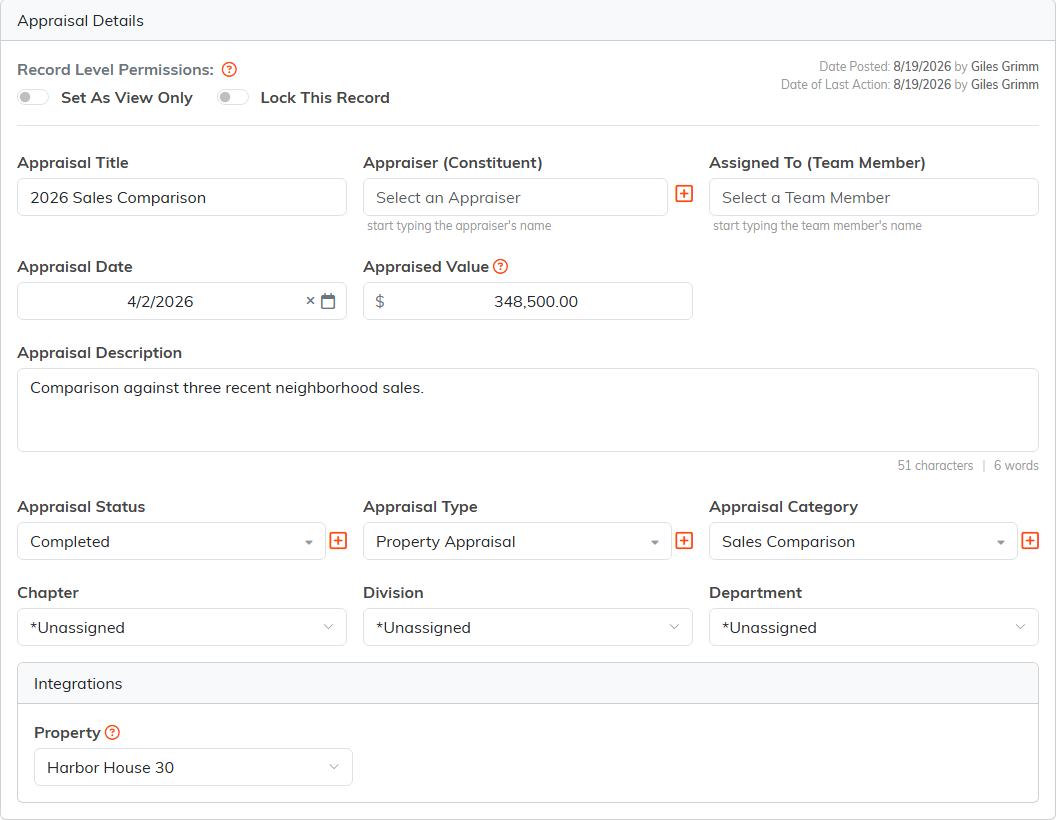
- Appraiser (Constituent): who performed the appraisal. This is a lookup, so the appraiser has to exist as a constituent before you can pick them. Add the firm or the individual to your constituents first and you will not get stuck part way through.
- Appraisal Date: when it was performed.
- Appraised Value: the value determined.
- Appraisal Description: free text.
- Appraisal Status, Appraisal Type and Appraisal Category.
- Assigned To (Team Member): the staff member responsible for it.
- Property: already filled in when you start from the property.
Argenta has no Purpose field on an appraisal. To record why one was done, such as an insurance renewal, a refinancing, or a sale, put it in Appraisal Description or set up an Appraisal Category for it.
Status, Type and Category Are Your Own Lists
Appraisal Status, Appraisal Type and Appraisal Category are classification codes, so the choices are whatever your organization has set up rather than a fixed list Argenta ships. Argenta does not supply values such as full, desktop or drive-by. To add or remove one, go to Classification Codes and open Appraisal Status Codes, Appraisal Types or Appraisal Categories. Editing classification codes needs Master Builder or Master Admin.
Attaching the Appraisal Report
Documents go on the appraisal record, not on the property. Open the appraisal and click Appraisal Files. Keep the full report, photographs and condition reports, comparable sales data, and the appraiser's credentials together there, so the valuation and its evidence never get separated. The appraisal record also has an Appraisal Notes tab and a Record Permissions tab.
Comparing Values Over Time
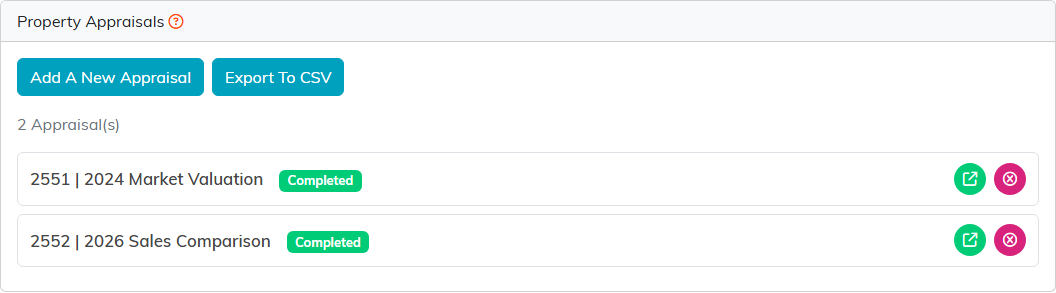
The property's Appraisals tab lists each appraisal as an ID and a title with a status badge, ordered by when the record was added rather than by appraisal date. It does not show dates or values, and Export To CSV from that tab returns only the ID, title, and status.
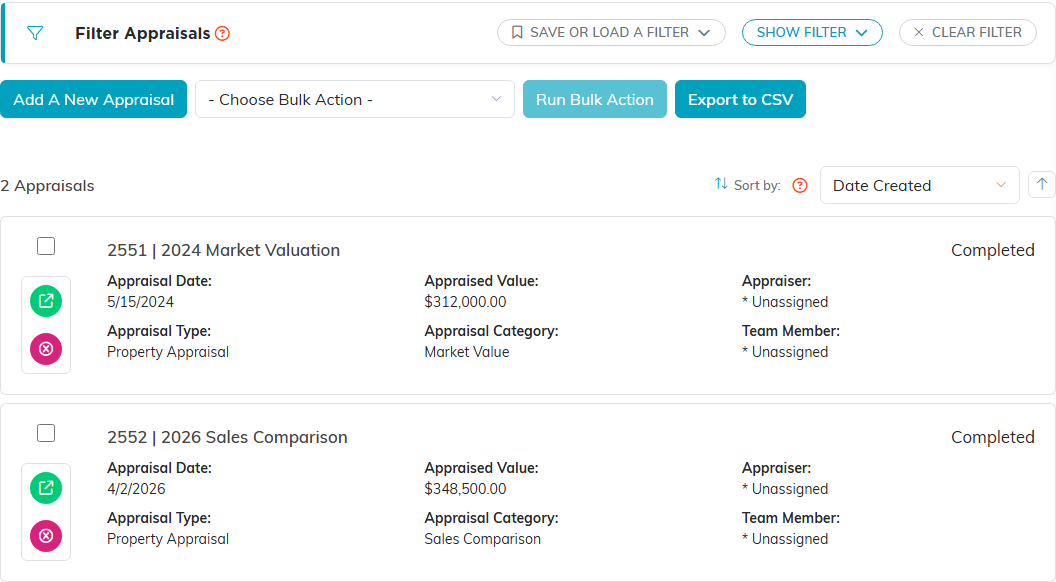
To compare values, use Property Management > Appraisals. Each appraisal there shows its Appraisal Date, Appraised Value, type, category, appraiser and team member, and you can sort the list by Appraisal Date. Filter Appraisals narrows it by date range, status, type, category, appraiser or team member. Click Export to CSV for a file with the property, the appraisal date, the appraiser and the appraised value, which is what you need to see how a value has moved.
There is no appraisal report and no property report in the Report Center, so the export is the route.
Getting the Most Out of It
- Put the year and the reason in the Appraisal Title, such as
2026 Insurance Renewal. The property tab shows the title and nothing else, so a vague title makes the list hard to read later. - Add the appraiser to your constituents before you start the record.
- Attach the report at the same time you enter the value. Tracking down a PDF a year later is what turns a record into a guess.
- Re-appraise on whatever schedule your insurer, lender, or auditor expects.
- Check your appraised values against your insurance coverage each year.
What an appraisal means for your accounts, your tax position, or a donated property is a question for your finance team or your accountant. Argenta records the valuation; it does not interpret it.
