Knowledge Base Article
How to Use Mail Merge for Letters and Labels
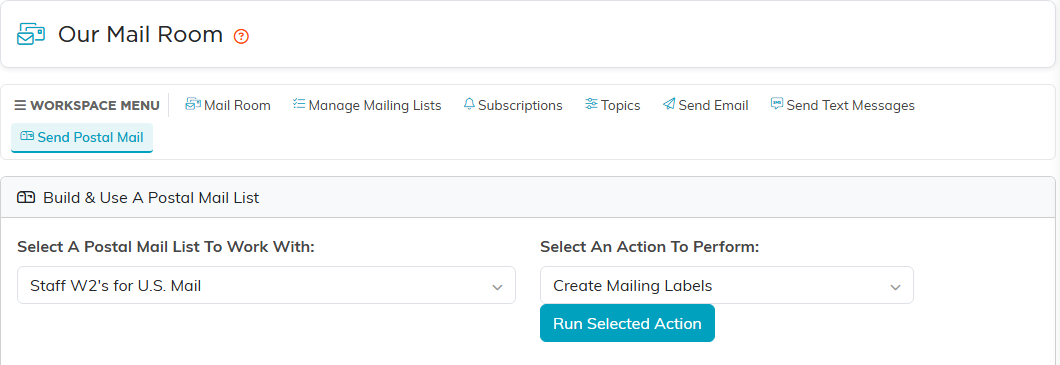
The Mail Room's postal side produces mailing labels and a CSV export. It does not generate merged letters.
- Go to the Mail Room and choose Send Postal Mail.
- Pick a list under Select A Postal Mail List To Work With.
- Under Select An Action To Perform, choose Export The List To CSV or Create Mailing Labels, and click Run Selected Action.
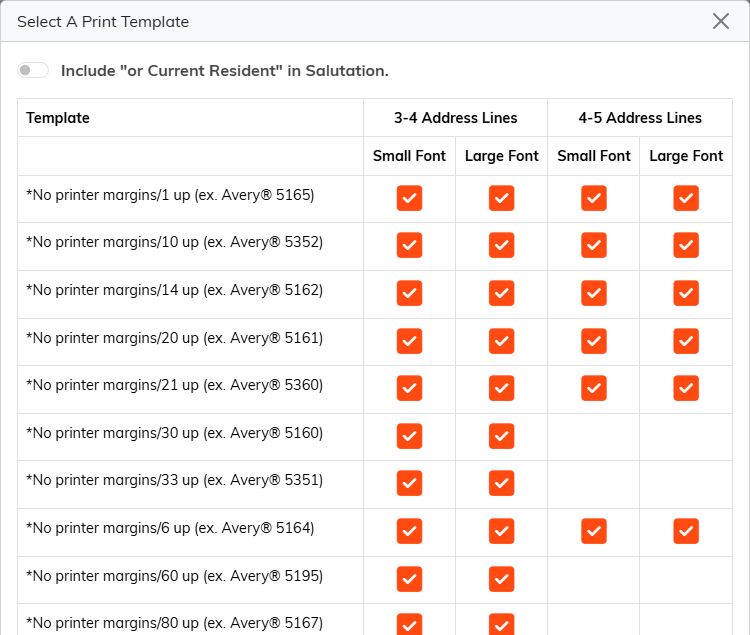
For labels, Select A Print Template opens. Each row is a label sheet, named by its Avery number and whether it uses no printer margins or your printer's default margins. Click the check mark in the column you want: 3-4 Address Lines or 4-5 Address Lines, each in a Small Font or a Large Font. Not every sheet offers every column. Turn on Include "or Current Resident" in Salutation first if you want it.
There is no letter merge
Those two actions are the whole list. There is no letter template, no merge preview and no generated PDF of letters. To produce personalized letters, export the list to CSV and merge it in your word processor.
Who is on the list, and who is not
A postal list always leaves out anyone marked as not OK to receive mail, and anyone marked deceased, whatever else you set.
Include "No Solicit" Constituents In List deserves care, and on the postal page it starts off, so those people are already left out of what you are looking at. Unlike the email pages, this is not only a preview filter: whatever is showing is exactly what gets exported to CSV, and what the labels are printed from. Turn it on and they go on your envelopes, so leave it off before any appeal.
