Knowledge Base Article
How to Track Engagement Scores
There are two different things in a constituent's workspace and they are easy to confuse, so start here:
- Engagement is a list of touchpoints. Things that happened.
- Score is the Constituent Score, a number from 0 to 100 recalculated every night, or straight away with Recalculate Now on the Score page.
A third thing, the Constituent Engagement Score Report in the Report Center, is a separate six-part score again. It shares the same 70/40/15 bands as the Constituent Score, which is exactly why the pages are named apart.
The Engagement page
It is a history, filterable by date range with This Month, Last 30 Days, This Year and Last Year shortcuts.
You cannot add an engagement from this page, though you can delete one. They arrive from elsewhere:
- Ticking records on the constituent list and running the Add Engagements To Selected Records bulk action.
- Answering Mark Contact As An Engagement when you add a contact log entry.
- Other parts of the app that log one for you.
The badge on each line says which part of the app it came from. Deleting one removes only the engagement, never the record behind it.
The Constituent Score
How involved somebody is right now, in four parts shown separately so the total is explainable: Breadth (how many kinds of activity), Depth (standing commitments such as being an active volunteer or member), Engagement (how much lately, with older activity counting for less) and Momentum (how recently they last did anything).
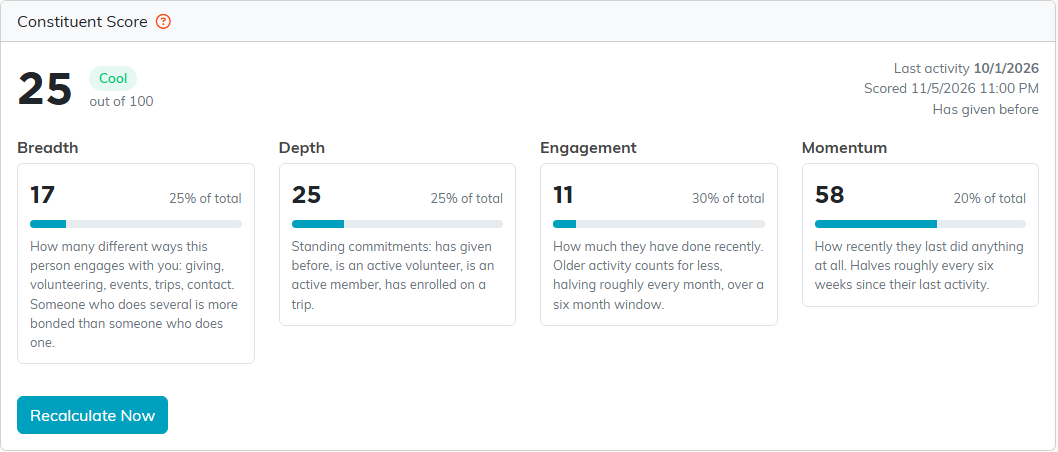
Breadth and Engagement only count the last 180 days, so older activity still shows on the record but stops adding points. What Drove This Score lists the activity behind the number, newest first, with what each item is worth today. An administrator sets the weights and bands under Subscription Settings, Constituent Scoring.
