Knowledge Base Article
How to Use Record Connections to Link Related Items
Records are linked from a Connections page inside the record's own workspace. Many record types have one.
- Open the record and choose Connections.
- Find the panel for the kind of record you want to link, such as Associated Programs.
- Start typing in its search box and pick the record.
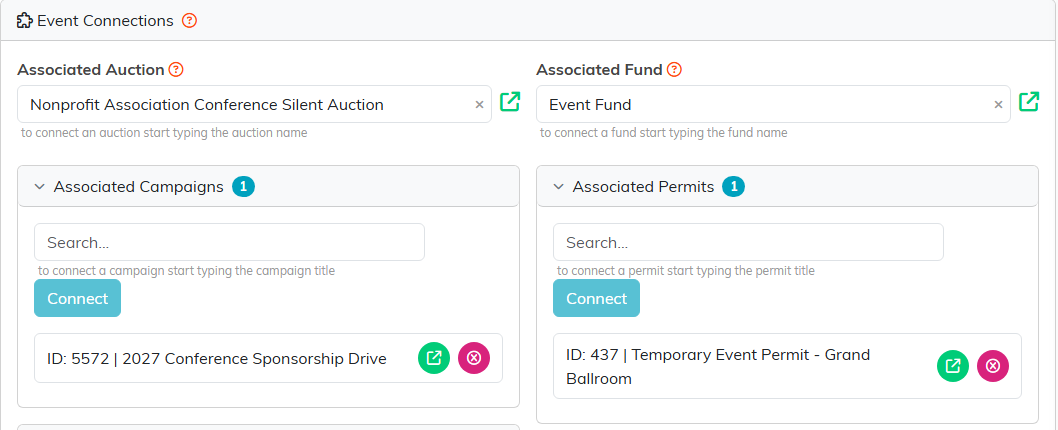
There is no record-type chooser and no save button. The panels are already on the page, one per kind of record. Pick a record in a panel and click its Connect button, and the link is written there and then. The single boxes at the top, such as Associated Auction, save the moment you pick.
What you can connect is fixed per record type
Each Connections page offers its own set of panels and no others, so this is not a free-form web. An event offers auction, campaigns, fund, permits, products, programs, projects, tasks, volunteer task groups and volunteer tasks. A grant offers deposits, expenses, programs, properties, tasks and time sheet tasks.
That means some pairings simply are not available. An event cannot be connected to a grant, for instance: neither page carries a panel for the other. Where the pairing exists it appears on both records, so you can make it from whichever one you have open.
Some panels take one record rather than many, and choosing a second replaces the first without asking.
