Knowledge Base Article
How to Import Constituents from Excel
To bulk import constituents from a spreadsheet:
- Open Constituents (CRM) > Constituent List and click the Import button above the grid. The button only shows for an administrator or a subscription admin.
- If you need the correct format, click Download the full import template. It has a column for every field Argenta can import, with a sample row.
- Prepare your file with constituent data:
- First Name, Last Name (required for individuals)
- Organization Name (required for organizations)
- Email, Phone, Address fields
- Any classification codes
- IsSolicitOk, marketing consent: No for anyone who unsubscribed from your newsletters, so marketing sends skip them while receipts still reach them
- IsEmailOk, for anyone who must get no email at all, not even receipts. Both take Yes or No, or 1 or 0. Leave a column out and everyone comes in as Yes
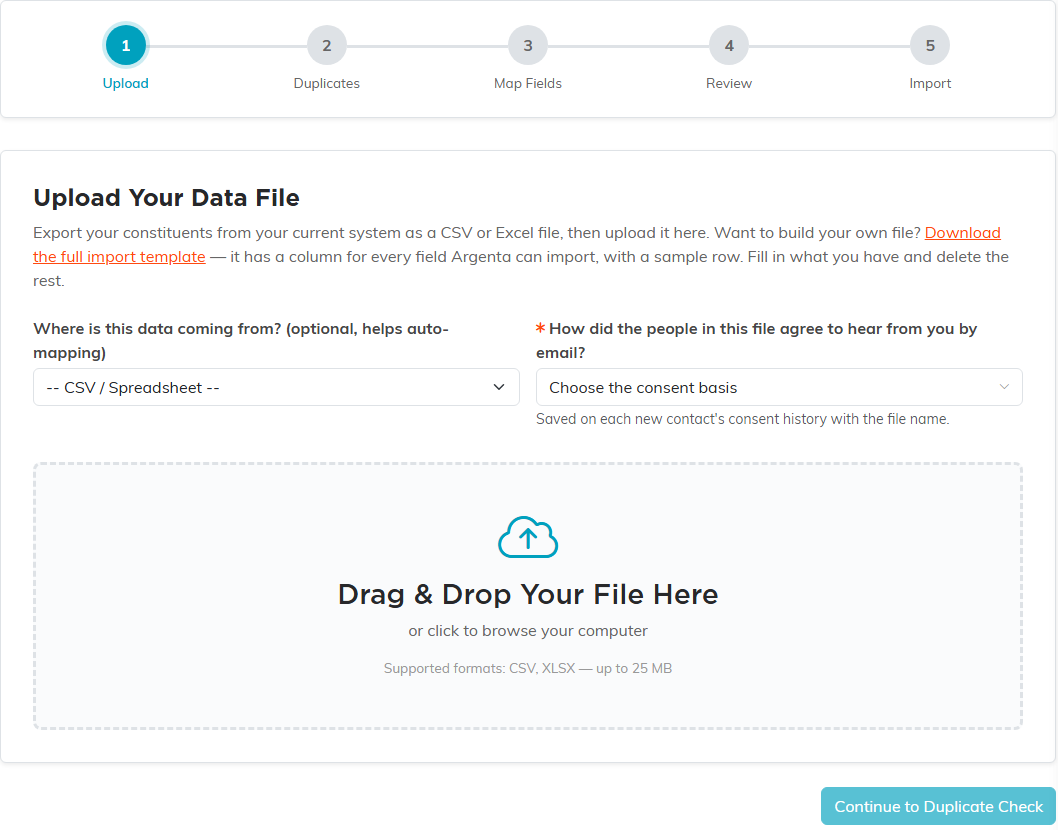
- On Upload Your Data File, choose where the data is coming from if you like (it helps the auto-mapping). Then answer the required question How did the people in this file agree to hear from you by email? Your answer is saved on each new contact's consent history with the file name.
- Drag your file onto the box, or click to browse. It can be a CSV or Excel (.xlsx) file of up to 25 MB. Click Continue to Duplicate Check.
- On Review Duplicates In Your File, decide what to do with rows that look like the same person: merge them or keep them separate.
- On Map Your Fields, match your spreadsheet columns to Argenta fields.
- On Review Before Importing, check for errors, then click Continue to Import and the Import button that shows how many constituents will come in.
Tips:
- Always back up your data before large imports
- Start with a small test batch first
- Read the last screen of the import, which counts the rows added, updated, skipped and failed
- Anyone imported with IsEmailOk set to No cannot be added to a mail room email list afterwards. They import perfectly well, they just will not join the list, which looks like the import failed when it did not
