Knowledge Base Article
How to Search for Constituents
There are two ways to find constituents in Argenta:
Quick Search
- Go to Constituents (CRM) > Constituent List.
- Type in the search box at the top right of the page.
- Search by name, email or constituent ID.

The list narrows as you type, so there is nothing to click and no need to press Enter. To find someone by phone number, use the Phone filter below.
Filtering
- Click Show Filter to open the filter options.
- Set criteria such as:
- Quick Views (Ready To Ask and Going Quiet) and Engagement
- Constituent Type (Individual, Household, Organization)
- Status
- Phone
- Location (City, State, County)
- Chapter, Division and Department
- Date Created
- Click Apply Filter.
- Click Clear Filter to reset.
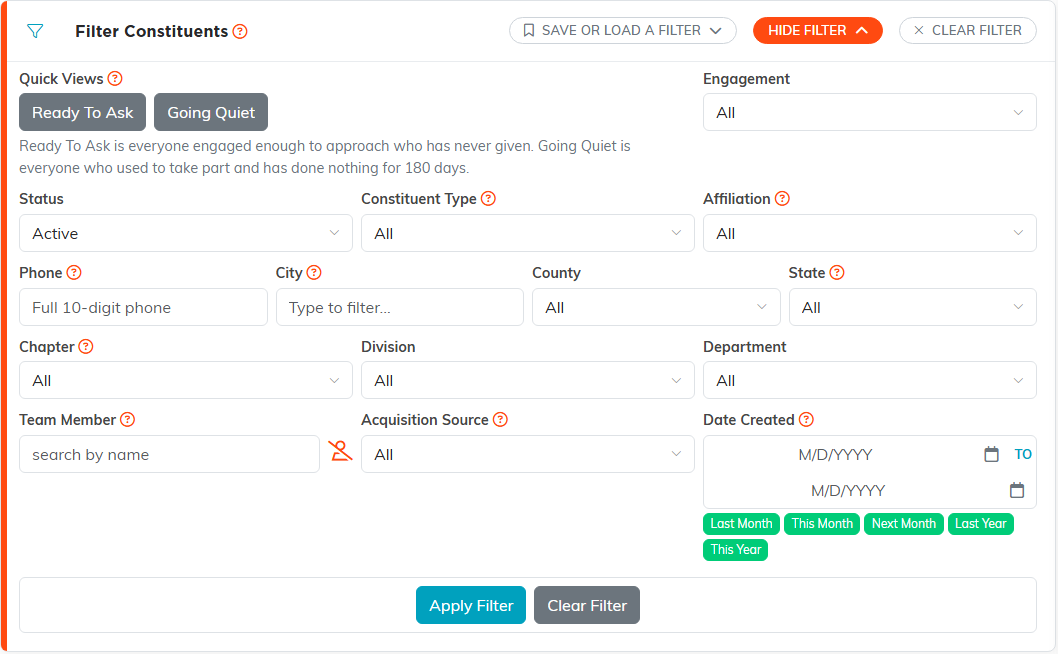
Tip: Click Save or Load a Filter, then Save This Filter, to keep a filter you use often and come back to it later.
