Knowledge Base Article
How to Add an Organization as a Constituent
To add a business, company, or organization to your constituent database:
- Go to Constituents (CRM) > Constituent List.
- Click Add A New Constituent at the top of the list.
- Argenta asks what type of constituent you want to create. Click An Organization.
- Enter the Organization Name. It is required and holds up to 150 characters.
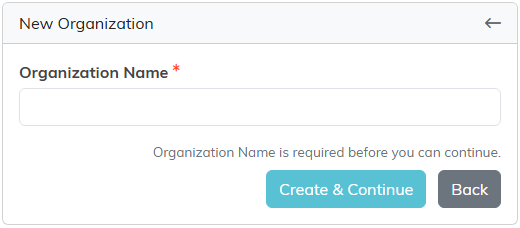
- Click Create & Continue. The record is created and opens in the Constituent Workspace.
The add screen asks for nothing but the name, so everything else is entered on the record afterwards. In the Workspace Menu, Org Details holds Organization Type, Organization Size, Industry, Year Established, Federal Tax ID, Tax Exempt and the mission and vision statements, among others, while Contact Info and Addresses hold the contact details. When you type a new Year Established, it has to be a four-digit year no later than this year, and a new Federal Tax ID has to be nine digits, such as 12-3456789. Either one can be left blank.
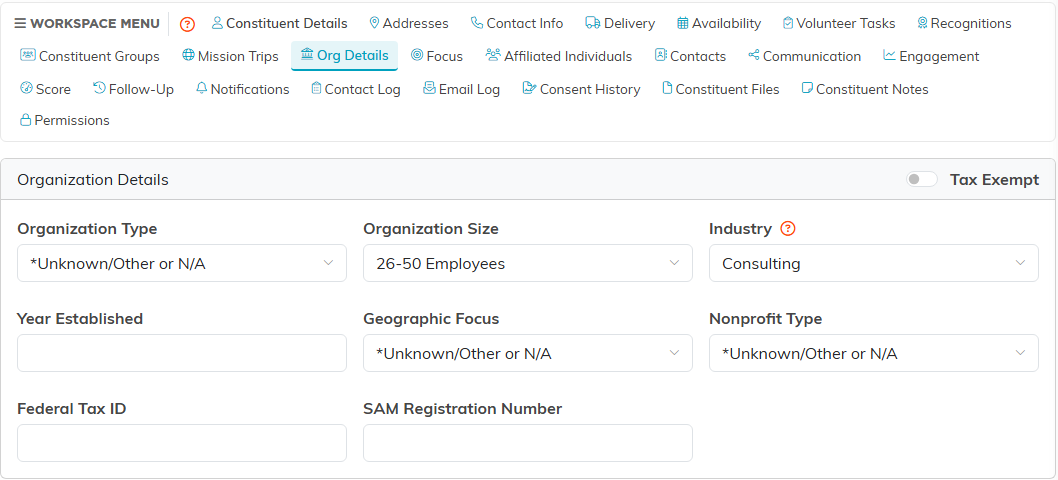
To record the people at that organization, use Contacts in the Workspace Menu. Affiliated Individuals lists the constituents associated with it.
