Knowledge Base Article
Add Awards And Recognitions
Argenta allows you to track and keep a record of all the awards and recognitions your organization gives out.
To track your awards and recognitions, select Constituents (CRM) > Awards and Recognitions - from the main menu on the left side of the screen:
This will take you to the Awards and Recognitions for Constituents list. These are the awards or recognitions your organization has given out. Click the "Add New" button (admins and Master Builders only):
This will open the Add A New Award/Recognition window:
From this window you need to fill out these fields:
- Category - Use the drop-down menu to select a category for your new Award/Recognition. If the category you want isn't listed, an admin can click the orange plus icon beside the drop-down to add a new one. If you don't have a category for your Award/Recognition, pick the option named *Unknown/Other or N/A, which sorts to the top of the list.
- Award/Recognition Title - You need to type a name for your new Award/Recognition. This is a required field.
- Description - You can enter a description for your new Award/Recognition here. This allows you to type in whatever information you need to know about this award.
Once you've completed all the necessary fields, click the "Add This Award/Recognition" button. This will add the award and return you to your awards/recognitions list.

Recognitions and Awards on a record. Pick one, set the date, Add.
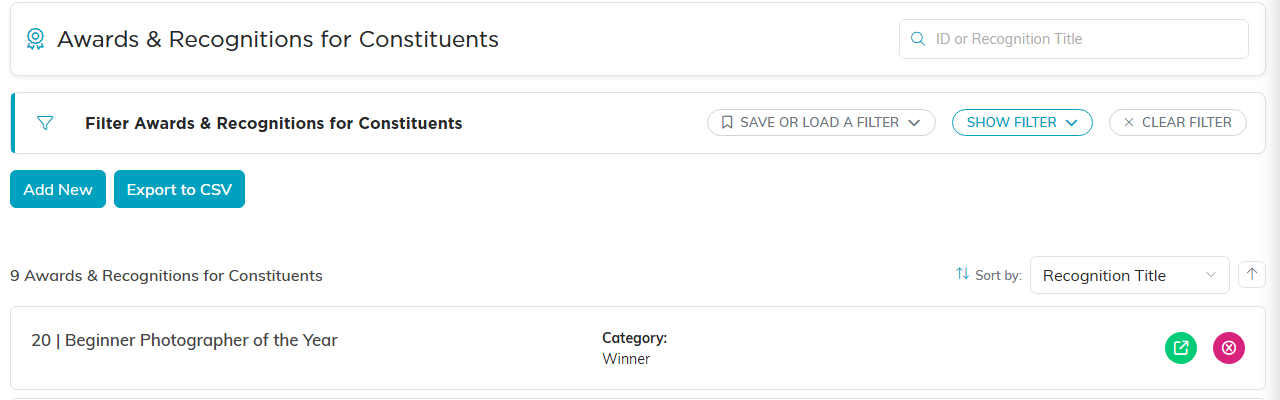
The Awards and Recognitions list, where the awards themselves are kept.
