Knowledge Base Article
Add Grantors
Grantors are the foundations, organizations, and donors that fund you. Before you can record a grant from someone, they have to exist in Argenta as a grantor.
A grantor is a constituent you designate as a grantor, so the person or organization needs to be a constituent first. If they are not in your database yet, you can add them without leaving the flow, or see Add Constituent - Individual.
Open Your Grantor List
From the menu on the left, go to either Grant Management > Grantors or Constituents > Grantors. Both open the same list.
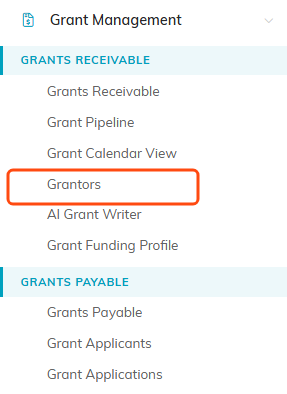
Grantors sits under Grants Receivable in the Grant Management menu.
Add A Grantor
- Click Add New. This opens Designate A Constituent As A Grantor.
- Constituent: start typing the name and pick them from the list. This is required. If the grantor is brand new, use the add icon to create the constituent right here.
- Grantor Type: pick from the list, for example foundation, government, or corporate. Not there? Add a new type with the add icon (admins and master builders only).
- Acquisition Source: how the relationship came about. You can add a new source the same way.
- Associated Campaign: optional. Start typing to link a campaign, or add a new one.
- Click Add Grantor & Enter Details.
That creates the grantor and drops you straight into its record, where you can fill in the rest, including Chapter, Division, Department, District, and Precinct.

Add New is the first button under the filter bar.
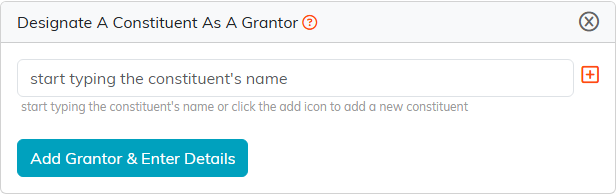
Pick the constituent, or use the orange add icon to create one without leaving.

The rest of the fields wait for you inside the grantor record.
Saving
On the grantor record, use Save All Changes to keep working, or Save All & Exit Record when you are done.

The save buttons sit at the bottom of the Grantor Details page.
A Couple Of Habits Worth Having
- Search before you add. Large funders are often already in your database from an earlier gift, and designating the existing record beats creating a duplicate.
- Always set Grantor Type. It costs a second now and it is what makes your funder list worth reporting on later.
- You do not have to add the grantor before the grant: the Grantor box on a grant searches all of your constituents, and Grantor is not a required field there.
