Knowledge Base Article
How To Use The Chart of Accounts in Argenta
The Chart of Accounts is the list of accounts your organization uses to categorize money. Every deposit, expense, and transfer points at one of these accounts, so the chart is what makes your financial reports add up the way your accountant expects.
Getting There
From the main menu, choose General Financials > Chart of Accounts.
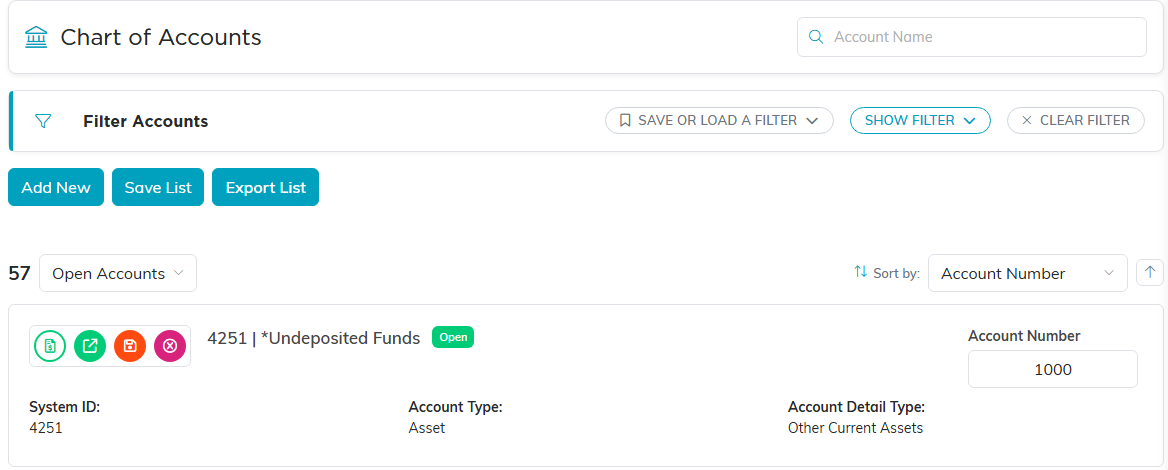
The Chart of Accounts list, sorted by account number.
Adding an Account
- Click Add New
- A short form opens, Add A New Account, asking for four things. All four are required:
- Account Number: the number from your accounting system. Keep these consistent, they are what your bookkeeper matches on
- Account Name. It has to be a name no other account on your team uses; Argenta ignores capitals and surrounding spaces when it compares, and refuses a duplicate when you save.
- Account Type: the broad classification. There are five: Asset, Liability, Equity, Income, and Expense
- Account Detail Type: the narrower classification within that type, for example Checking or Savings under Asset. This list only offers detail types your own team has set up under the Account Type you picked, so changing the type above empties it, and on a brand-new chart it can be empty to start with. Use the orange plus (admins and master builders only) beside the field to add one; it is added for your team only and is selected for you straight away
- Click Add & Enter Details. The account is created at this point and opens on its own page. Cancel & Exit leaves without creating anything. If the number you chose is already on another account, Argenta names that account and asks you to choose a different one.
- On the account, set Account Status, whether the account is in use, then fill in the optional fields where they help:
- Date Opened
- Account Description
- Institution's Account Number: the account number at your bank, for accounts that live at a financial institution
- Contact Name and Contact Phone Number: your contact at the institution
- Click Save All Changes & Continue, or Save All Changes & Exit to save and return to the list

Add New sits above the list.

The orange asterisk marks a required field.

Account Type is the broad classification. Account Detail Type narrows it.

The institution fields, for accounts that live at a bank.
Editing Several Accounts at Once
The Chart of Accounts list is editable in place. Make your changes across the list and click Save List to save them together, which is quicker than opening each account when you are doing a cleanup pass.

Save List saves every change you made across the list at once.
Inside an Account
Open an account and the workspace gives you:
- Account Details: everything above
- Account Register: the activity recorded against this account, and the way into Reconcile Account. On an account with no check register this tab is called Transactions.
- Bank Feed: on an account with a check register, connects it to your bank so Argenta pulls the posted bank transactions in every day for you to reconcile against
- Account Files and Account Notes: statements, documentation, and context
- Record Permissions: who can reach this account
Each tab of the Account Workspace has a short Show Me How To Use This Page video at the top right; click it to watch, and use its chapters to jump to the part you need.

The workspace tabs inside an account.
Finding and Exporting
Search the list by account name or account number, filter it, and use Export List to hand the chart to your accountant or pull it into a spreadsheet.

The search box at the top right finds an account by its name or its number. Export List writes the chart to a CSV file.
A Few Habits Worth Keeping
- Agree on your numbering scheme before you start adding accounts, and stick to it
- Set an account's status rather than deleting it, so its history stays intact
- Keep the chart as small as it can be. Every extra account is another place a transaction can be filed wrong
