Knowledge Base Article
How To Close an Event for Public Registration and Ticket Sales
Closing an event means closing its public registration and ticket sales form so people can no longer sign up. You can do it by hand at any time, and there are several settings that close the form on their own.
Closing It by Hand
Change the event's status on Event Details from Registration Open to Registration Closed. Only Registration Open lets people register or buy tickets, so switching the status is the whole job.
Each tab of the Event Workspace has a short Show Me How To Use This Page video at the top right; click it to watch, and use its chapters to jump to the part you need.

Only Registration Open lets people sign up.
What Closes the Form Automatically
- Open Registration Date. The current date and time has to be after this for the form to be open, so an event with a future open date is not live yet.
- Close Registration Date. The current date and time has to be before this. Leave it blank and registration stays open with no end date.
- Max Number of Guests. Once registrations reach the number you set on Event Details, the form closes on its own.

Reach this number and the form closes on its own.
If You Are Selling Tickets
Ticket types have their own limits, set on the Ticket Settings page in the event workspace (under the Tickets & Sessions group). Each type carries:
- Start Sales Date and End Sales Date. Outside that range the ticket type is no longer offered. When every ticket type has passed its end date, the public form closes.
- Max. Tickets Available. Used when Check To Limit The Amount of Tickets Available is ticked for that type. When a type sells out it stops being offered, and when every type is sold out the form closes.
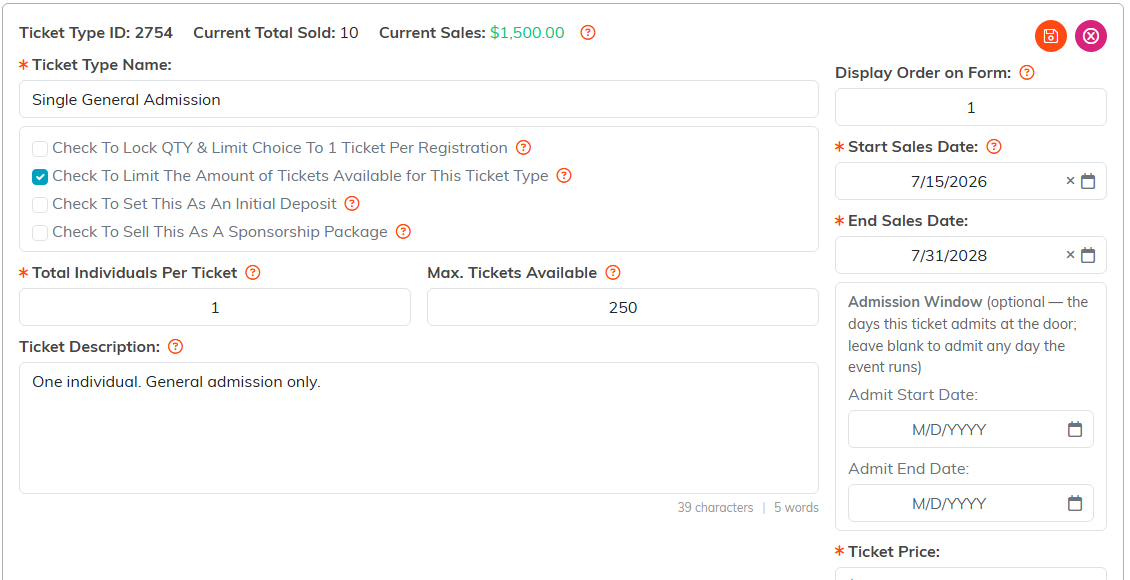
Each ticket type carries its own dates and quantity.
Why the Form Might Be Closed When You Did Not Close It
If your form is unexpectedly unavailable, work down this list: the status, the open date, the close date, the max guest count, and then each ticket type's sales dates and remaining quantity. One of those five is almost always the answer.
For turning registration back on, see How to Set Up Event Registration.
