Knowledge Base Article
How Do I Send Email To Our Email Lists
If you have an Argenta Email Opt-In form on your website, visitors can sign up to hear from your organization and their choice is stored on their constituent record. When you want to send a newsletter or an announcement, you build a mail room list from those people using the Constituent Communication Report.
Build the list
- Open the Report Center from the top right of the header
- Click the Custom Mailing Lists category card
- Open the Constituent Communication Report
- In Communication Method(s), choose the methods you want to reach
- If you need to narrow it further, filter by one or more affiliations. Picking more than one widens the list: choosing Donors and Volunteers gives everyone who is either
- Click Run Report
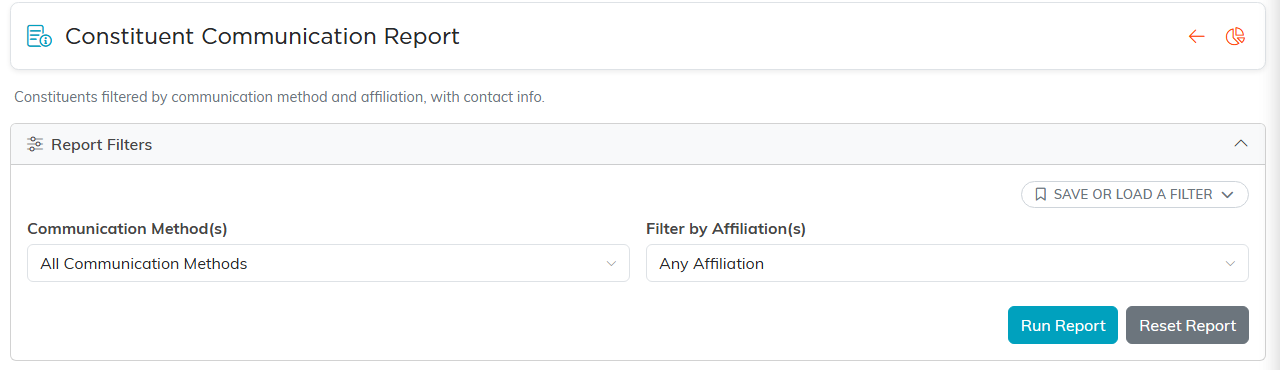
The report, with the two filters the steps above use.
Which communication method to pick
This is the step people get wrong, so it is worth being exact. Sign-ups from the Argenta Email Opt-In form are recorded as General Email Communications, not as Newsletter (Email). If you pick Newsletter (Email) you will get a different group of people and everyone who signed up through your form will be missing.
Newsletter (Email) is still a real method. It is simply the one you set on a record yourself, rather than the one the sign-up form writes.
Send it to the Mail Room
- Tick the records you want, or choose Select All Records That Meet The Current Filter Criteria in the bulk actions bar to take the whole list
- In the bulk actions bar, choose Create A New Mailroom List With Selected Records and click Run Bulk Action
- Give the list a title you will recognize later, choose the list type, and add it
If you already have a list and want to top it up, choose Add Selected Records To An Existing Mailroom List instead. These Mail Room actions only appear for users with the Mail Room Manager permission, and for Master Admins.
Your new list is then available in the Mail Room, where you build the email template and send it.
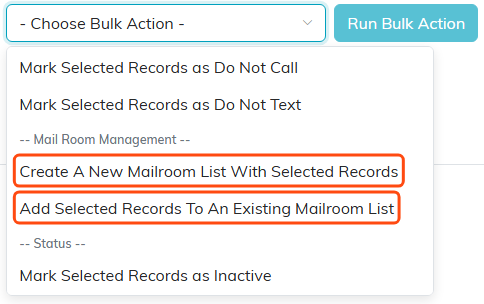
Both Mail Room options sit in the bulk actions menu.
If you cannot open this report
The Constituent Communication Report is limited to mail managers and administrators, and you reach it through the Report Center, which needs Report Manager or administrator access. If it does not appear for you, ask whoever manages your users to check your access.
