Knowledge Base Article
Volunteer Shifts With Nobody Signed Up
Argenta looks ahead once a day for volunteer tasks that are coming up with nobody signed up for them, and emails your organization a list. The screens and the email both call these shifts; they are the same volunteer tasks you create under Volunteer Tasks.
This arrives switched on. You can turn it off, and you can change how far ahead it looks.
The email you get
The subject line counts what it found, for example 4 volunteer shifts are coming up with nobody signed up. When the shifts belong to a chapter, the chapter leads the subject, for example North County: 4 volunteer shifts are coming up with nobody signed up, and the opening sentence names it in brackets after your organization, so someone who gets one of these for each chapter can tell them apart. Inside, each shift is listed with its title, the day and time it starts, its task group, its location, and a link straight to it.
Shifts that go to the same person arrive as one email rather than one for each shift.
Where the setting lives
- Click Subscription Settings.
- Click Volunteer Settings. The Uncovered Shift Alert card holds everything on this page.

Volunteer Settings sits between Giving Capacity and Webhooks.
You need to be an administrator or a subscription manager to open this page.
Turning it off
Clear the Email me about shifts with nobody signed up checkbox, then click Save All Changes. Nothing else emails you about uncovered shifts, so once this is off the only way to see them is to open the Currently Unassigned Volunteer Task Report yourself.

The switch, shown turned on. This is how every team starts.
How far ahead it looks
Click How far ahead to look and select a window. The choices are 2, 3, 5, 7, 14, 21, and 30 days ahead, and new teams start at 7 days.
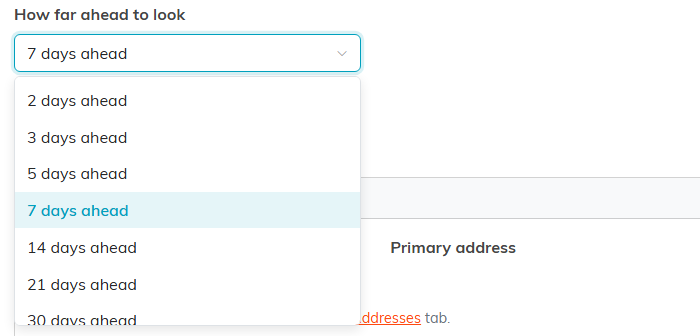
The seven windows you can choose from.
A shorter window means fewer emails about more urgent shifts. A longer window gives you more time to find somebody, and a longer list to read.
Where the email goes
The digest goes to your organization, or to the organizer of the task group a shift belongs to when that person is one of your own users. It is never sent to a contact named on an individual shift, because that person is often outside your organization and this email carries internal links. Argenta uses the first of these three that is filled in:
- The organizer of the shift's task group, but only when that person is an active user on your team. An organizer who is not a user on your team is skipped, and so is a shift that belongs to no group at all.
- Your Volunteer notifications address.
- Your Primary address.
Because the organizer comes first, two shifts in the same run can go to different people, and each person gets their own email covering only the shifts that resolved to them.
Both addresses are shown on the Volunteer Settings page so you can see where the email will land. Change either of them on the Designated Email Addresses tab.

The card on the Volunteer Settings page. Your own two addresses appear under these labels.
If none of the three is filled in, the shift is skipped rather than emailed to nobody. It is not marked as reported either, so it appears in the next day's email as soon as you fill either address in.
What counts as nobody signed up
A shift is included when all of the following are true:
- No volunteer is assigned to it.
- It is not marked complete.
- It has a title.
- It starts today or later, and within your chosen window.
These are the same conditions the Currently Unassigned Volunteer Task Report uses, so the email and that report agree with each other.
Each shift is reported once, unless you turn on repeats
Every team starts with each shift mentioned in one email and never again, so a task sitting unfilled for three weeks does not email you every morning. A shift that somebody signs up for before the email is due is never mentioned at all.
To be reminded every day instead, turn on Repeat a shift every day until someone signs up, then click Save All Changes. With it on, a shift is in every day's email, starting the first day it falls inside your window, until somebody signs up for it or its date passes.

The switch, shown turned off. This is how every team starts.
With repeats off, treat the email as a prompt to act rather than a running list. The Currently Unassigned Volunteer Task Report is the running list, and it is there whenever you want it.
